Overview
Integration flows allow data to be transferred from niotix to third-party systems based on events. The data to be transferred can be filtered and transformed before transmission, so that only the relevant data packets are forwarded in the format required by the target system.
In principle, the following data can be used in an integration flow:
- Every data packet received from an incoming connector
- Every change to a data point of a Virtual Device
- Every change to a data point of a Digital Twin
- Every alarm log entry created
For an integration flow, all data generated for the respective account is initially taken into account. Filters can be defined to process only the required records — for example to restrict data to a specific Digital Twin or connector (see “Filters” section). Data can also be transformed before forwarding via a connector to convert it into the desired structure or format (see “Transformations” section). At the end of an integration flow there is exactly one connector step — this step can however contain multiple outgoing connectors, allowing data to be forwarded simultaneously to several target systems.
Create an integration flow
In the Integrations > Integration Flows navigation item, use the Create button to create a new integration flow. The following dialog opens:
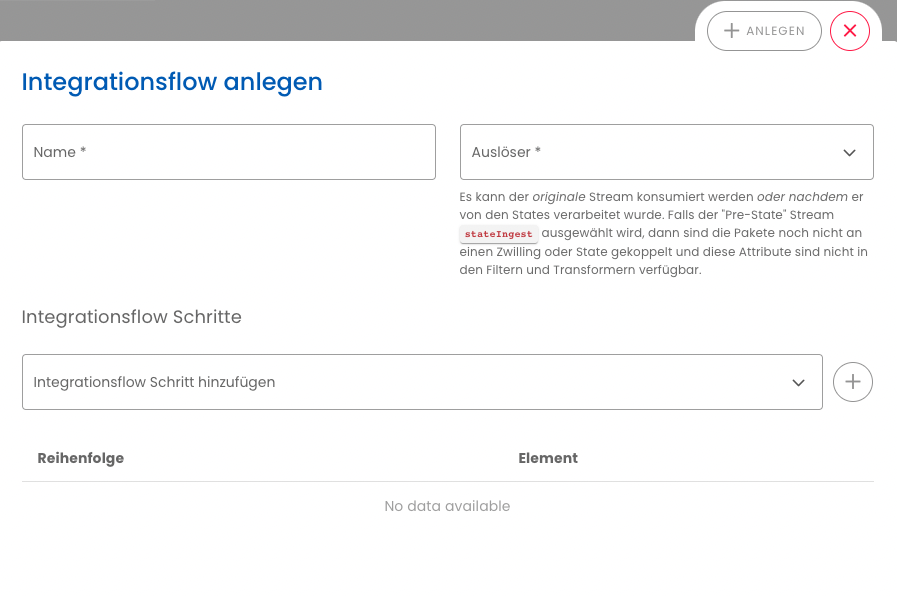
The niotix backend delivers data in generic format by default. If the data is to be forwarded to a system that expects JSON, a transformation must be added before the connector step in the integration flow — with input type generic and output type application/json.
- Name: A unique name for the integration flow.
- Account: The account for which the integration flow applies. Cannot be changed after creation.
- Trigger: Determines which type of data triggers the flow. The following options are available:
- BEFORE STATE-HANDLING: Data stream after the connector transformation, but before assignment to a Virtual Device or Digital Twin. Each incoming packet generates a message — once for
_parsed(full measurement JSON) and once for each individual variable. Meta information such asdtwin_idortwin_tagsis not available. Data object structure: Before State-Handling object. - AFTER STATE HANDLING: Every change to a data point of a Virtual Device or Digital Twin. Meta information such as
dtwin_id,twin_tags,vdevice_groupsand custom properties is available. Data object structure: After State Handling object. - ALARMLOG WAS CREATED/RESOLVED: Triggered as soon as an alarm log entry is created or resolved. Data object structure: Alarm log object. Usage example: Best practice — Alerts in Slack & Microsoft Teams
- BEFORE STATE-HANDLING: Data stream after the connector transformation, but before assignment to a Virtual Device or Digital Twin. Each incoming packet generates a message — once for
- Integration flow steps: Filters, transformations and the final connector can be added to the flow via the dropdown. The order can be adjusted using drag-and-drop.
- Order: The last step must be the connector step. The flow cannot be saved if no connector step is present or if it is not in the last position. Within the connector step, multiple outgoing connectors can be added using the icon — data is then sent in parallel to all selected target systems.
Explanation of the BEFORE STATE-HANDLING object
The BEFORE STATE-HANDLING object contains the data after the connector has received it and the device driver has parsed it into named measurement values — but before any assignment to a Virtual Device or Digital Twin takes place. The field value holds the measurement values as parsed by the device driver.
Each incoming packet generates multiple messages: one containing all measurements together (meta.parser_variable: "_parsed") and one per individual measurement value. The field meta.parser_variable indicates which measurement value the respective message refers to.
{
  "meta": {
    "account_id": 1250,
    "config_id": 557,
    "source_identifier": "my-device-external-id",
    "parser_variable": "_parsed",
    "timestamp": "2024-07-12T13:09:45.901Z"
  },
  "value": {
    "flowtemperature": 72.4,
    "returntemperature": 55.1,
    "volume": 900
  }
}
Field descriptions:
| Field | Type | Description |
|---|---|---|
meta.account_id |
number |
Account ID |
meta.config_id |
number |
ID of the incoming connector |
meta.source_identifier |
string |
External device ID (identifier from the incoming packet) |
meta.parser_variable |
string |
Variable name, e.g. _parsed or flowtemperature |
meta.timestamp |
string |
Packet timestamp (ISO 8601) |
value |
any |
Data value: object with all measurements (for _parsed) or individual value (for a single variable) |
Fields such as dtwin_id, twin_tags, vdevice_groups, state_id or unit are not available in this context, as the data has not yet been assigned to a Virtual Device or Digital Twin.
Explanation of the “After state handling” object
The AFTER STATE HANDLING object is the default format of the packets sent out from niotix in the integration flow. If the data format needs to be adapted before forwarding to a third-party system, a Transformation step must be added to the flow before the connector step.
The following information about the associated Virtual Device or Digital Twin is available in the object. Each change to a single data point generates a separate message in the integration flow.
Differences between Virtual Device and Digital Twin:
The twin_category field indicates whether the source is a virtualDevice or a digitalTwin. The fields vdevice_groups, device_type_id, device_driver_id, operational_status, and config_type are only set for Virtual Devices and are empty or null for Digital Twins. The twin_ancestor_ids field contains the IDs of parent Digital Twins for a Virtual Device; for a Digital Twin at the top of the hierarchy it is empty. The source_type is typically bridge for Virtual Devices (data received from a connector) and virtual-device for Digital Twins (data forwarded from a child Virtual Device).
{
  "meta": {
    "timestamp": "2024-07-12T13:09:45.901Z",
    "state_id": 1178539,
    "dtwin_id": 63797,
    "dtwin_title": "My device",
    "twin_tags": ["tag1"],
    "twin_ancestor_ids": [
      63796
    ],
    "twin_category": "virtualDevice",
    "vdevice_groups": [
      "group1",
      "group2",
      "group42"
    ],
    "device_type_id": 1957,
    "device_driver_id": 1957,
    "operational_status": 3,
    "geolocation": {
      "latitude": 71.17092,
      "longitude": 25.783081,
      "address": "Storgata 78, 9008 Tromsø, Norway"
    },
    "unit": null,
    "state_identifier": "_parsed",
    "state_type": "json",
    "account_id": 1250,
    "config_id": 557,
    "config_type": "bridge-incomingwebhook",
    "source_type": "bridge",
    "source_identifier": "my-device-external-id",
    "parser_variable": "_parsed",
    "twin_key_value": {
      "key": "value",
      "custom": "info",
      "additional": "properties"
    },
    "target_reference_id": [
      {"GIS_ID": 123}
    ]
  },
  "value": {
    "persons": 23,
    "flowtemperature": 55,
    "returntemperature": 35,
    "battery": 2.75
  }
}{
"meta": {
"timestamp": "2024-07-12T13:09:45.901Z",
"state_id": 1178540,
"dtwin_id": 63797,
"dtwin_title": "My device",
"twin_tags": ["tag1"],
"twin_ancestor_ids": [
63796
],
"twin_category": "virtualDevice",
"vdevice_groups": [
"group1",
"group2",
"group42"
],
"device_type_id": 1957,
"device_driver_id": 1957,
"operational_status": 3,
"geolocation": {
"latitude": 71.17092,
"longitude": 25.783081,
"address": "Storgata 78, 9008 Tromsø, Norway"
},
"unit": "°C",
"state_identifier": "flowtemperature",
"state_type": "number",
"account_id": 1250,
"config_id": 557,
"config_type": "bridge-incomingwebhook",
"source_type": "bridge",
"source_identifier": "my-device-external-id",
"parser_variable": "flowtemperature",
"twin_key_value": {
"key": "value",
"custom": "info",
"additional": "properties"
},
"target_reference_id": [
{"GIS_ID": 123}
]
},
"value": 55
}{
"meta": {
"timestamp": "2024-07-12T13:09:45.901Z",
"state_id": 9984231,
"dtwin_id": 12001,
"dtwin_title": "Building A",
"twin_tags": ["city-center", "commercial"],
"twin_ancestor_ids": [],
"twin_category": "digitalTwin",
"vdevice_groups": [],
"device_type_id": null,
"device_driver_id": null,
"operational_status": null,
"geolocation": {
"latitude": 53.5511,
"longitude": 9.9937,
"address": "Rathausmarkt 1, 20095 Hamburg, Germany"
},
"unit": null,
"state_identifier": "status",
"state_type": "json",
"account_id": 1250,
"config_id": null,
"config_type": null,
"source_type": "virtual-device",
"source_identifier": "sensor-001",
"parser_variable": "status",
"twin_key_value": {
"building_type": "office",
"floor_count": "5"
},
"reference_id": [
{"MeLo": 12345678}
]
},
"value": {
"activeAlarms": 2,
"avgTemperature": 21.5,
"totalEnergy": 1250.5
}
}{
"meta": {
"timestamp": "2024-07-12T13:09:45.901Z",
"state_id": 9984232,
"dtwin_id": 12001,
"dtwin_title": "Building A",
"twin_tags": ["city-center", "commercial"],
"twin_ancestor_ids": [],
"twin_category": "digitalTwin",
"vdevice_groups": [],
"device_type_id": null,
"device_driver_id": null,
"operational_status": null,
"geolocation": {
"latitude": 53.5511,
"longitude": 9.9937,
"address": "Rathausmarkt 1, 20095 Hamburg, Germany"
},
"unit": "kWh",
"state_identifier": "totalEnergy",
"state_type": "number",
"account_id": 1250,
"config_id": null,
"config_type": null,
"source_type": "virtual-device",
"source_identifier": "sensor-001",
"parser_variable": "totalEnergy",
"twin_key_value": {
"building_type": "office",
"floor_count": "5"
},
"reference_id": [
{"MeLo": 12345678}
]
},
"value": 1250.5
}-
meta: Contains the meta information for the data point that has changed.
- timestamp: Timestamp at which the change was registered. Example:
2024-07-12T13:09:45.901Z - state_id: ID of the data point. Example:
1178539 - dtwin_id: ID of the Digital Twin or Virtual Device to which this data point belongs. Example:
63797 - dtwin_title: Title of the Digital Twin or Virtual Device to which this data point belongs. Example:
My device - twin_tags: List of tags. Example:
["tag1"] - twin_ancestor_ids: List of Digital Twins above this Virtual Device or Digital Twin in the hierarchy. Example:
[63796] - twin_category: Category of the twin or device.
virtualDeviceordigitalTwin - vdevice_groups: Groups to which the Virtual Device belongs. Example:
["group1", "group2", "group42"] - device_type_id: ID of the device type. Example:
1957 - device_driver_id: ID of the device driver. Example:
1957 - operational_status: Operating status of the device.
0= not set;1= “On the move”;2= “Ready for operation”;3= “In operation”;4= “Temporarily inactive”;5= “Decommissioned”. - geolocation: Geographical location of the device.
- latitude: Latitude. Example:
71.17092 - longitude: Longitude. Example:
25.783081 - address: Address of the device. Example:
Storgata 78, 9008 Tromsø, Norway
- latitude: Latitude. Example:
- unit: Unit of measurement. Example:
number - state_identifier: Key of the data point. Example:
_parsed - state_type: Data type of the data point. Example:
json - account_id: ID of the associated account. Example:
1250 - config_id: ID of the connector. Example:
557 - config_type: Type of connector. Example:
bridge-incomingwebhook - source_type: Source of the data point.
bridge= connector;virtual-device= Virtual Device;virtual-device-aggregate= Virtual Device aggregation;none= none;timeseries-aggregate= aggregated over time;aggregate= aggregation;random= random - source_identifier: External ID / Device ID. Example:
my-device-external-id - parser_variable: Parser variable. Example:
_parsed - twin_key_value: User-defined properties of the Virtual Device / Digital Twin. Example:
{"key": "value", "custom": "info", "additional": "properties"} - reference_id:
digitalTwinonly: list of destination references for dynamic data routing. Typically[]when no such configuration exists. Example with entries:[{"MeLo": 12345678}]. - target_reference_id:
virtualDeviceonly: list of target references for dynamic data routing. Typically[]when no such configuration exists. Example with entries:[{"GIS_ID": 123}]. - twin_reference_id: Optional. Only when the binding type is
dynamical-data-routing(see Dynamical Data Routing) and references are set: merged object of reference IDs. Omitted otherwise. - outbound_values: Optional. Only when the data point has outbound configuration: associated configuration data for forwarding. For structure and IEC-104 addresses, see niotix IEC-104 server.
- timestamp: Timestamp at which the change was registered. Example:
-
value: Contains the value of the data point.
Alarm log was created/resolved object
The following information is available in the ALARMLOG WAS CREATED/RESOLVED object:
{
  "meta": {
    "account_id": 1239,
    "account_name": "Documentation",
    "timestamp": "2024-07-12T11:09:11.152Z"
  },
  "value": {
    "alarm_log_id": 7674,
    "alarm_log_parent_id": null,
    "alarm_origin_type": "virtual-device",
    "alarm_message": "Battery below 3000 mV",
    "alarm_origin": {
      "id": 63770,
      "title": "my-device",
      "tags": [],
      "groups": [],
      "link": "https://niotix.io/#/virtual-devices/63770"
    },
    "alarm_level": "error",
    "log_category": "battery",
    "is_resolved": false
  }
}
- meta: Contains the meta information for the generated alarm log entry.
- account_id: Account for which the alarm log entry was created.
- account_name: Name of the account for which the alarm log entry was created.
- timestamp: Timestamp at which the alarm log entry was created.
- value: Contains the parameters of the alarm log entry.
- alarm_log_id: ID of the alarm log entry.
- alarm_log_parent_id: When an alarm log entry is resolved, the ID of the originating alarm log entry is shown here.
- alarm_origin_type:
virtual-deviceif the source of the alarm log entry is a Virtual Device.smart-groupif the source is a Smart Group. - alarm_message: Content of the configured error/warning message.
- alarm_origin: Contains detailed information about the source entity of the alarm log entry.
- id: ID of the Virtual Device or Smart Group.
- title: Title of the Virtual Device or Smart Group.
- tags: Tags are only available for Virtual Devices.
- groups: Groups are only available for Virtual Devices.
- link: Link to open the Virtual Device or Smart Group.
- address: Address is only available for Virtual Devices.
- alarm_level:
error= “Error” level defined in configuration;warning= “Warning” level defined in configuration. - log_category:
nullif no category is set. Otherwise one ofconnectivity,battery,deviceorpacket-threshold. - is_resolved:
falseif the alarm log entry is unresolved.trueif the entry has been resolved.
Tips for connector configuration
Recommended setup order for Integration Flows:
1. Create an outgoing connector.
2. Prepare filters and transformations as needed.
3. Create an integration flow: select a trigger, assign filter and transformation, set the outgoing connector as the target.
4. Verify the result via the Connector Logs of the outgoing connector.
Dynamic URLs and topics: The Webhook (Outgoing) and MQTT (Outgoing) connectors support metadata placeholders in the URL or topic within an integration flow, e.g. https://my-system.com/devices/{{dtwin_id}}/data/ or niotix/{{account_id}}/{{dtwin_id}}/state. A full list of available meta values is in the quick reference under Transformations.
Kafka payload format: The Kafka (Outgoing) connector expects the payload as a key-value array: [{"key": "my_key", "value": "my_value"}]. A transformation with input type generic and the appropriate output format must be added before the Kafka step.
Overview of the connectors available for integration flows
The following outgoing connectors can be used for integration flows: