Alarm log entries can be used via integration flows for active, immediate alerting using the ALARM_LOG WAS CREATED/RESOLVED trigger to Slack / Microsoft Teams or other alerting systems.
Send messages to Slack via webhook
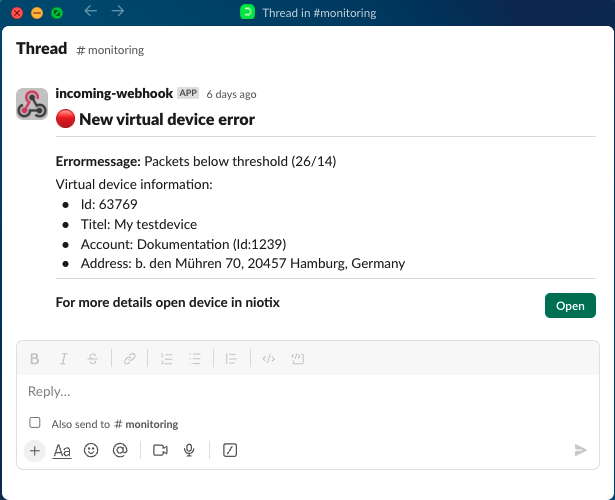
This chapter shows how the following exemplary message from a niotix alarm protocol entry can be triggered in Slack:
Setting up the connector
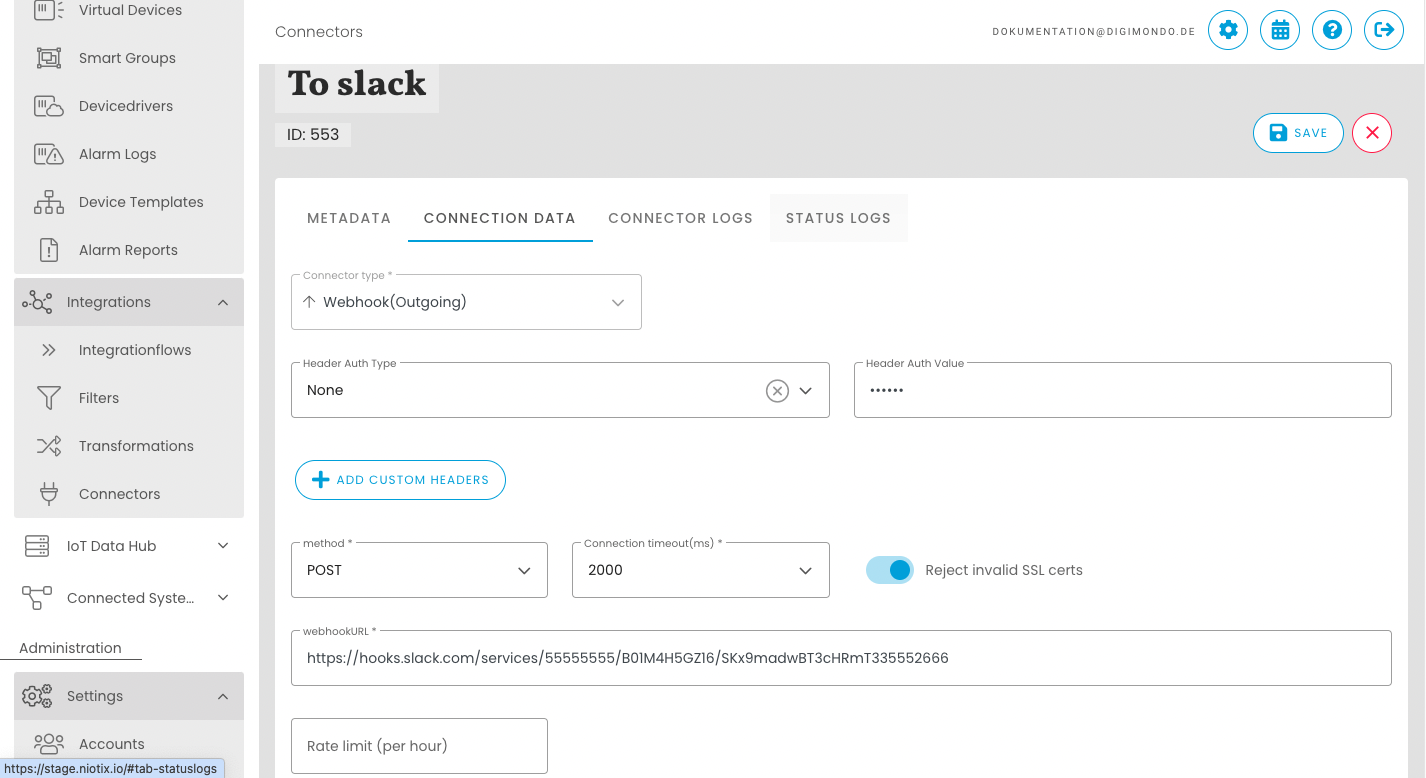
The messages are forwarded to Slack via webhook. The necessary configuration in Slack can be found in the Slack documentation: Slack documentation.
Once the webhook has been set up by Slack, the url can be used in a “Webhook(Outgoing)” connector as webhookURL.
Setting up a transformation
To create a well-structured message, a transformation can be used that structures the data from the ALARM_LOG WAS CREATED/RESOLVED event in the format expected by Slack. Example of such a transformation in JSONATA:
{
    "blocks": [
        {
            "type": "header",
            "text": {
                "type": "plain_text",
                "text": $.value.is_resolved ? ":green_circle: Resolved Alarmlog" : ":red_circle: New Alarmlog",
                "emoji": true
            }
        },
        {
            "type": "divider"
        },
        {
            "type": "section",
            "text": {
                "type": "mrkdwn",
                "text": "*Errormessage:* " & $.value.alarm_message
            }
        },
        {
            "type": "rich_text",
            "elements": [
                {
                    "type": "rich_text_section",
                    "elements": [
                        {
                            "type": "text",
                            "text": "Virtual device information:"
                        }
                    ]
                },
                {
                    "type": "rich_text_list",
                    "style": "bullet",
                    "elements": [
                        {
                            "type": "rich_text_section",
                            "elements": [
                                {
                                    "type": "text",
                                    "text": "Id: "
                                },
                                {
                                    "type": "text",
                                    "text": $string($.value.alarm_origin.id)
                                }
                            ]
                        },
                        {
                            "type": "rich_text_section",
                            "elements": [
                                {
                                    "type": "text",
                                    "text": "Title: "
                                },
                                {
                                    "type": "text",
                                    "text": $.value.alarm_origin.title
                                }
                            ]
                        },
                        {
                            "type": "rich_text_section",
                            "elements": [
                                {
                                    "type": "text",
                                    "text": "Account: "
                                },
                                {
                                    "type": "text",
                                    "text": $.meta.account_name & " (Id:" & $.meta.account_id & ")"
                                }
                            ]
                        },
                        {
                            "type": "rich_text_section",
                            "elements": [
                                {
                                    "type": "text",
                                    "text": "Address: "
                                },
                                {
                                    "type": "text",
                                    "text": $.value.alarm_origin.address
                                }
                            ]
                        }
                    ]
                }
            ]
        },
        {
            "type": "divider"
        },
        {
            "type": "section",
            "text": {
                "type": "mrkdwn",
                "text": "*For more details open device in niotix*"
            },
            "accessory": {
                "type": "button",
                "text": {
                    "type": "plain_text",
                    "text": "Open",
                    "emoji": true
                },
                "value": "click_me_123",
                "url": $.value.alarm_origin.link ,
                "style": "primary",
                "action_id": "button-action"
            }
        }
    ]
}
Setting up a filter
If not all alarm log entries are to be forwarded, filters can be used to restrict the messages to be forwarded. Examples:
- Only threshold alarms from a specific smart group (with ID 42) should be taken into account:
"$.value.alarm_origin.id = 42 and $.value.log_category = 'packet-threshold'" - Only alarm protocol entries from a specific device group with the level “error” should be taken into account:
"group42" in $value.alarm_origin.groups and $value.alarm_level = "error"
Create integration flow
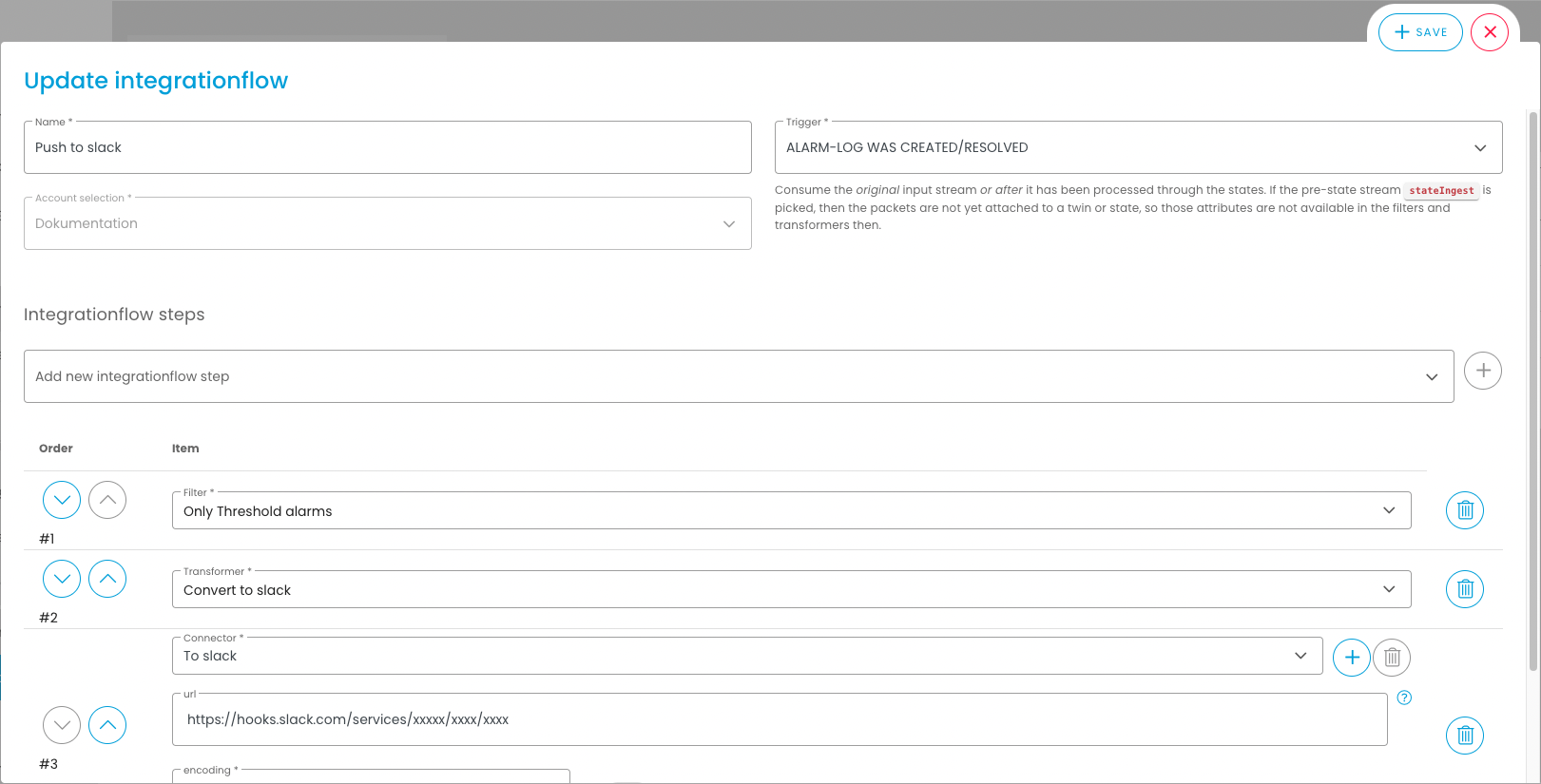
In the final step, the transformation, connector and optionally the filter are linked together in an integration flow with the trigger ‘ALARM_LOG WAS CREATED/RESOLVED’: