Receiving Data in niotix
niotix can receive data from a wide variety of sources, transmission technologies, and protocols (technology-agnostic). Incoming connectors are used to receive data, handling the specific tasks of each transmission technology. Each incoming connector offers the option to transform incoming data into the standard format described on this page via a configurable template — this is required when the source data format differs from the standard format. The available incoming connectors and the template configuration are described here: Incoming connectors.
Sending Data to Virtual Devices or Digital Twins
To add context to data, it can be written to either a Virtual Device (a digital representation of a physical sensor or system) or a Digital Twin (a digital representation of a physical object). Measurements are stored in Data States, which allow for a historical record of individual values. Device-specific transformations — e.g. parsing HEX payloads or mapping raw values to target variables — are defined in the Device Driver.
Depending on the target object, the input data format and addressing method differ:
| Virtual Device | Digital Twin | |
|---|---|---|
| Addressing | identifier (External ID) |
routing (Dynamical Data Routing) or identifier (Data Source: Connector) |
Meaning of time |
Timestamp of packet ingestion | Measurement timestamp (timestamp of the Data State update) |
| Payload format | JSON object or HEX string | JSON value |
| Multiple packets | As JSON array | As JSON array |
If the incoming data does not match the expected format, it can be transformed into the standard format via a template in the connector.
Sending Data to a Virtual Device
Data packets for Virtual Devices are addressed using the identifier, which must match the External ID of the Virtual Device. Since data packets often contain multiple compressed measurements, the Device Driver associated with the Virtual Device can decode the data and distribute it to target variables. (Device Driver documentation)
For Virtual Devices, the time value represents the timestamp of packet ingestion. If time is not set, the current system time is used.
Plain Data (JSON Payload)
For plain data, measurements are passed as a JSON object under data.value.payload:
{
  "identifier": "device-42",
  "data": {
    "value": {
      "payload": {
        "temperature": 23.5,
        "humidity": 60
      }
    },
    "time": "2025-03-21T13:12:01.157Z"
  }
}
identifier: External ID of the Virtual Device.data.value.payload: JSON object with the key-value pairs of the measurements. The keys correspond to the target variables defined in the Device Driver.data.time: Timestamp of packet ingestion. If omitted, the current system time is used.
Compressed Data (HEX Payload)
For HEX payloads, the encoded payload is passed as a string. The Device Driver associated with the Virtual Device handles the decoding:
{
  "identifier": "device-42",
  "data": {
    "value": {
      "payload": "002B406EA710",
      "port": 42
    },
    "time": "2025-03-21T10:30:46.157Z"
  }
}
identifier: External ID of the Virtual Device.data.value.payload: HEX-encoded payload containing the measurements.data.value.port(optional): Port number, if the payload should be decoded differently depending on the port.data.time: Timestamp of packet ingestion. If omitted, the current system time is used.
Multiple Packets as Array
To transmit multiple data packets in a single request, the objects are passed as a JSON array:
The maximum number of packets per array is 50 objects by default and can be configured via an environment variable.
[
  {
    "identifier": "device-42",
    "data": {
      "value": {
        "payload": {
          "temperature": 23.5,
          "humidity": 60
        }
      },
      "time": "2025-03-21T13:12:01.157Z"
    }
  },
  {
    "identifier": "device-43",
    "data": {
      "value": {
        "payload": {
          "temperature": 21.0,
          "humidity": 55
        }
      },
      "time": "2025-03-21T13:12:05.157Z"
    }
  }
]
Sending Data to a Digital Twin
Data States in Digital Twins can be addressed using two methods: Dynamical Data Routing (default) or direct addressing via identifier (when “Connector” is configured as the data source).
For Digital Twins, the time value represents the measurement timestamp — i.e. the point in time when the physical measurement occurred. This may differ from the time of packet ingestion. If time is not set, the current system time is used.
Dynamical Data Routing (Default)
The default method for Digital Twins is Dynamical Data Routing. Using routing, one or more Digital Twins can be addressed via the combination of a reference key and reference ID value. This method is particularly useful when Data States of different Digital Twins are populated via the same connector, or when switching connectors without reconfiguring Data States:
{
  "routing": {
    "stationsId": "42"
  },
  "variable": "volume",
  "data": {
    "value": 900,
    "time": "2025-03-21T10:45:04Z"
  }
}
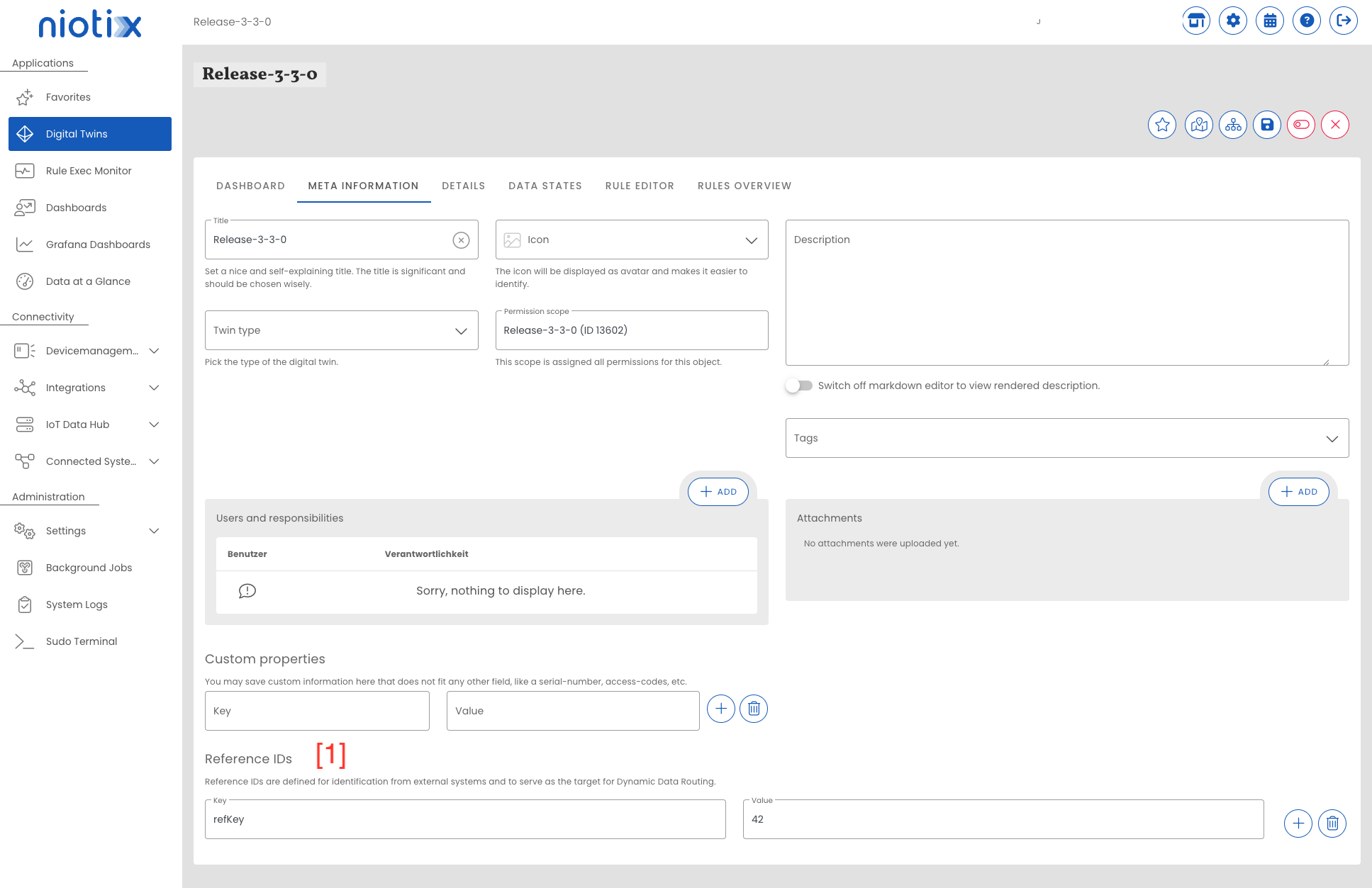
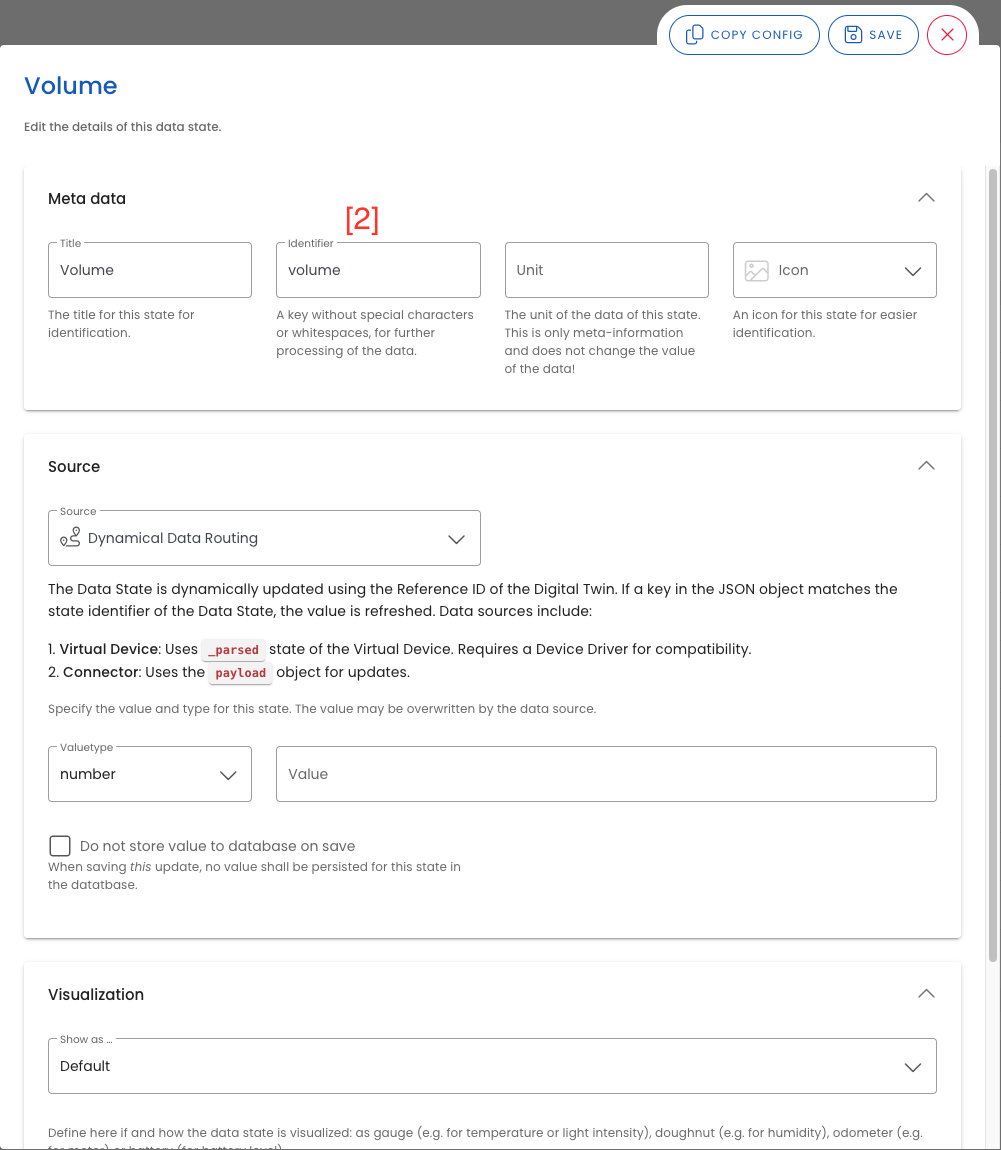
routing: Object with exactly one key-value pair. The key (stationsIdin the example) corresponds to the Reference ID Key configured in the Digital Twin; the value ("42") to the associated Reference ID Value. All Digital Twins with a matching key and value are addressed. See[1]variable: Key of the Data State in the Digital Twin. See[2]data.value: Measurement to be written to the Data State.data.time: Measurement timestamp. If omitted, the current system time is used.
The reference key and reference ID value are stored in the Digital Twin under Meta Information:
The variable is stored in the Data State under the field “Key”:
Direct Addressing via Identifier (Data Source: Connector)
As an alternative to Dynamical Data Routing, a Data State can be addressed directly when “Connector” is configured as the data source. Addressing uses the combination of identifier and variable:
{
  "identifier": 42,
  "variable": "consumption",
  "data": {
    "value": 100,
    "time": "2025-03-21T09:26:04Z"
  }
}
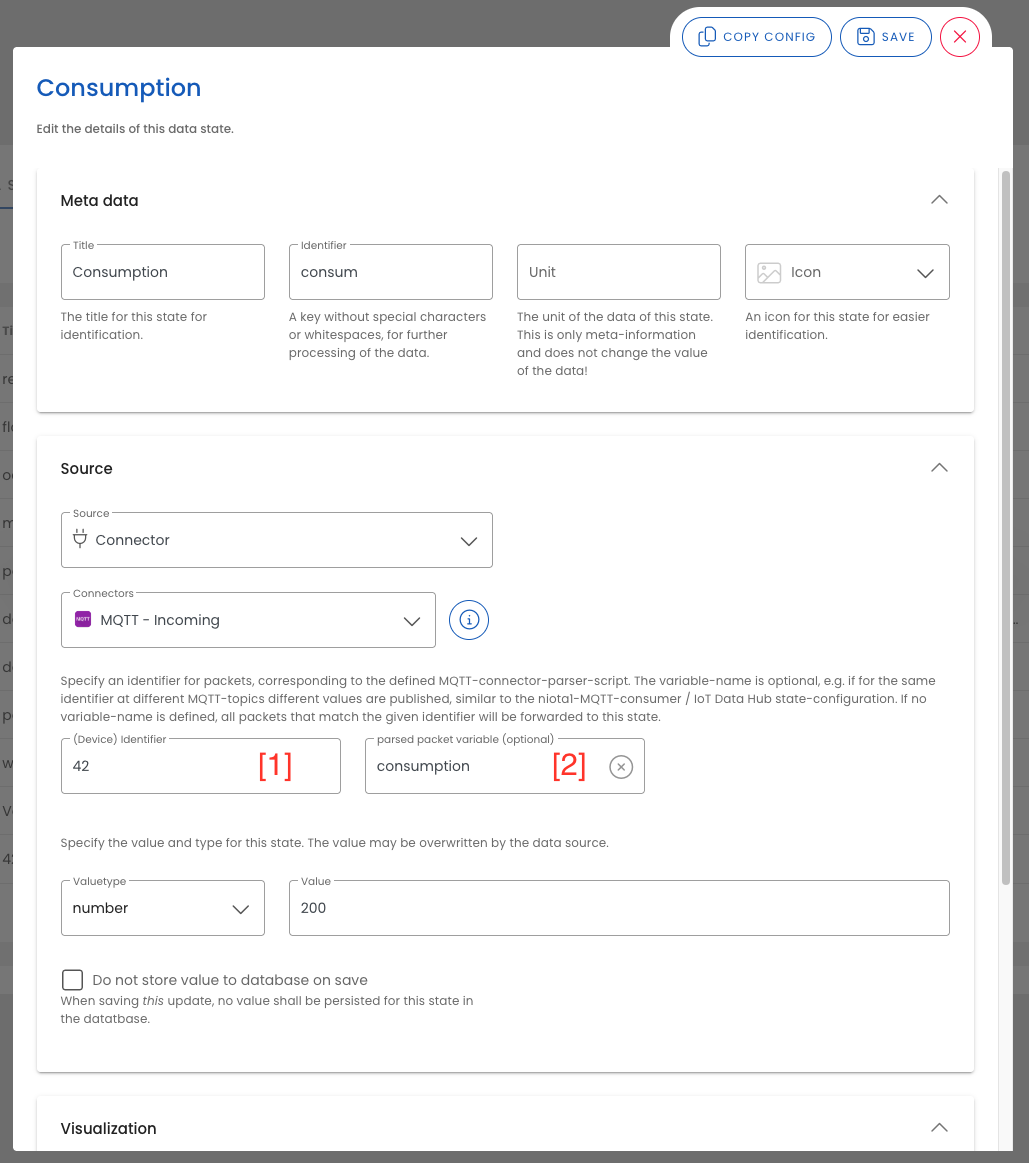
identifier: Must match the identifier stored in the Data State. The identifier identifies a specific device in the source system, ensuring the correct Data State is addressed when variable names are not unique. See[1]variable: Must match the variable name of the Data State. The value comes from the connector — when using the pass-through template, this is typically the variable name from the source system. See[2]data.value: Measurement to be written to the Data State.data.time: Measurement timestamp. If omitted, the current system time is used.
Matching example of a Data State configuration:
Multiple Packets as Array
To transmit multiple data packets in a single request, the objects are passed as a JSON array. This applies to both addressing methods:
The maximum number of packets per array is 50 objects by default and can be configured via an environment variable.
[
  {
    "routing": {
      "stationsId": "42"
    },
    "variable": "volume",
    "data": {
      "value": 900,
      "time": "2025-03-21T10:45:04Z"
    }
  },
  {
    "routing": {
      "stationsId": "42"
    },
    "variable": "energy",
    "data": {
      "value": 100,
      "time": "2025-03-21T10:45:04Z"
    }
  }
]
[
{
"identifier": 42,
"variable": "consumption",
"data": {
"value": 100,
"time": "2025-03-21T09:26:04Z"
}
},
{
"identifier": 42,
"variable": "voltage",
"data": {
"value": 230,
"time": "2025-03-21T09:26:04Z"
}
}
]