In this section, you can find the current and past release notes with major releases and the changelog.
June 29, 2026
This release introduces the following improvements:
June 22, 2026
This release introduces the following improvements:
June 16, 2026
This release introduces the following improvements:
May 27, 2026
This release introduces the following improvements:
April 29, 2026
This release introduces the following improvements:
April 28, 2026
This release introduces the following improvements:
April 21, 2026
This release introduces the following improvements:
April 9, 2026
This release introduces the following improvements:
March 31, 2026
Mandatory Two-Factor Authentication per Account
We have introduced an important security feature: mandatory account-wide two-factor authentication (2FA). Administrators can now enforce 2FA for all users within an account. When this policy is active, users who have not yet completed the 2FA setup will be guided through the setup process during login before gaining access to the platform. This significantly reduces the risk of account takeovers in the event of compromised passwords.
Copy Device Templates
With this release, Device Templates can be copied both within an account and across different accounts. This makes it faster and easier to manage similar sensor fleets.
Search in Connector Logs
Connectors now include a search function to quickly find relevant log entries.
The search covers both payload and metadata; the search term is preserved in the URL, enabling shareable, filtered views.
Numerous Additional Improvements
As with every release, this version includes further enhancements to the stability and reliability of our platform. A key highlight is a comprehensive optimization of our processing pipeline in conjunction with the time-series database. This enables data to be written redundantly to multiple databases - for example, to improve load distribution or to fall back to a secondary database in the event of a failure.
March 4, 2026
This release introduces the following improvements:
February 27, 2026
This release introduces the following improvements:
February 26, 2026
This release introduces the following improvements:
25. February/26. February 2026
This release updates API routing so secure cookie authentication works across customer-specific frontend domains. This is an improvement needed to comply with increasing requirements towards security. Check the following cases to determine whether action is required:
Action is required if at least one of the following applies to you:
Case 1: You log in with federated authentication (OAuth2 or OIDC).
Case 2: You use a mail connector with the service Outlook365 (OAuth2.0).
Case 3: You host your own niotix instance.
If none of the cases above apply, no action is required. Please note one additional limitation introduced by this security update:
Automatic Grafana/Node-Red login (SSO) only works on https://niotix.io/. If users access niotix through a custom domain, they need to enter their username and password again when opening Grafana/Node-Red.
Customers using federated authentication must update the OAuth redirect URI in niotix under Settings -> Accounts to keep secure cookie authentication working.
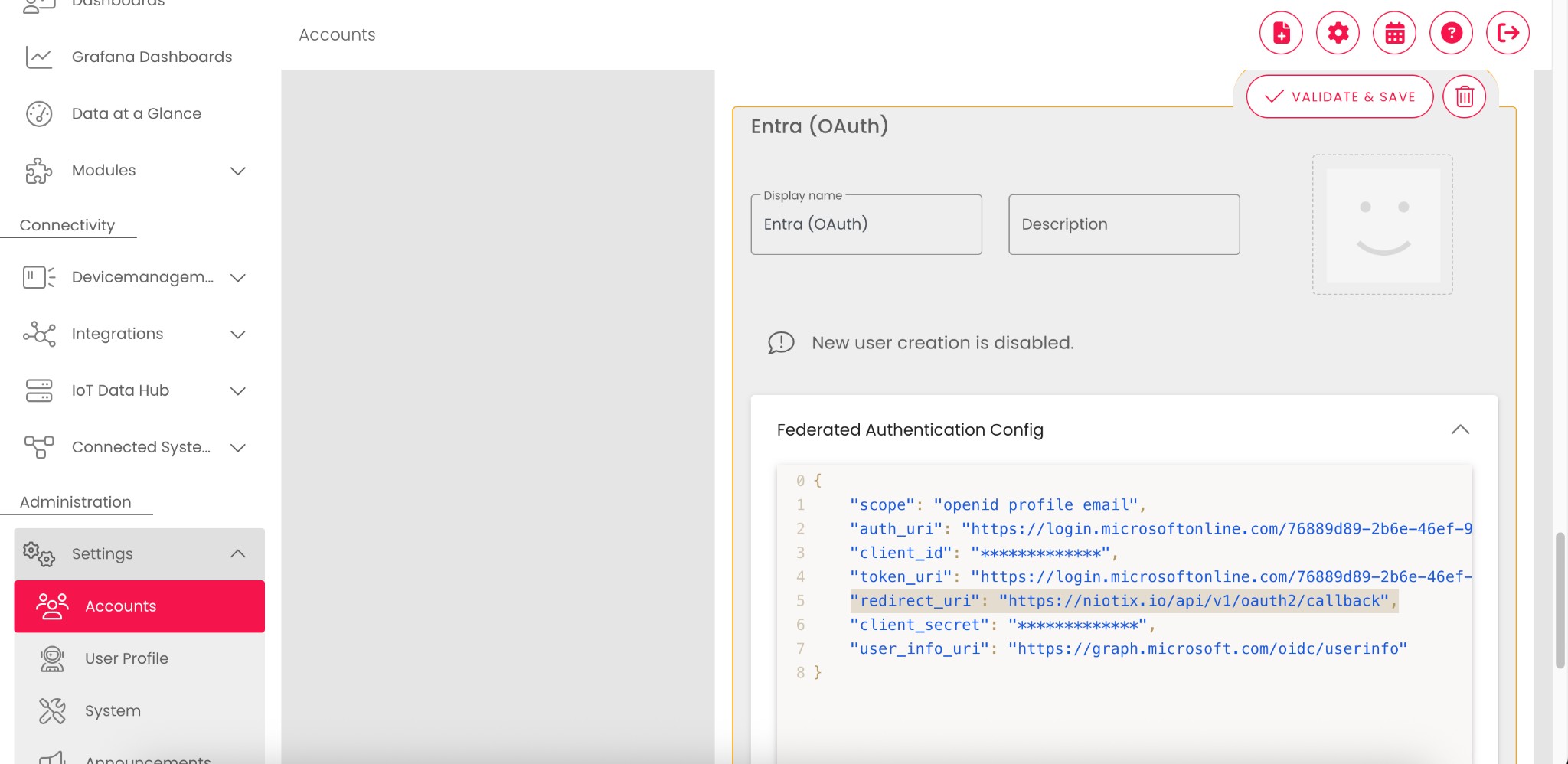
In the federated authentication configuration, change redirect_uri from the API domain to the frontend domain (including the /api path).
This configuration only works if the redirect URI domain matches the domain the user actually uses to log in. Example: redirect_uri = https://{yourdomain}/api/v1/oauth2/callback only works when users sign in via https://{yourdomain}.
The following JSON is an example for Microsoft Entra OAuth:
Before:
{
    "scope": "openid profile email",
    "auth_uri": "https://login.microsoftonline.com/***/oauth2/v2.0/authorize",
    "client_id": "***",
    "token_uri": "https://login.microsoftonline.com/***/oauth2/v2.0/token",
    "redirect_uri": "https://api.niotix.io/api/v1/oauth2/callback",
    "client_secret": "***",
    "user_info_uri": "https://graph.microsoft.com/oidc/userinfo"
}
After:
{
    "scope": "openid profile email",
    "auth_uri": "https://login.microsoftonline.com/***/oauth2/v2.0/authorize",
    "client_id": "***",
    "token_uri": "https://login.microsoftonline.com/***/oauth2/v2.0/token",
    "redirect_uri": "https://niotix.io/api/v1/oauth2/callback",
    "client_secret": "***",
    "user_info_uri": "https://graph.microsoft.com/oidc/userinfo"
}
For Microsoft Entra specifically, the new redirect URI can be added in addition to the existing one to prepare the migration.
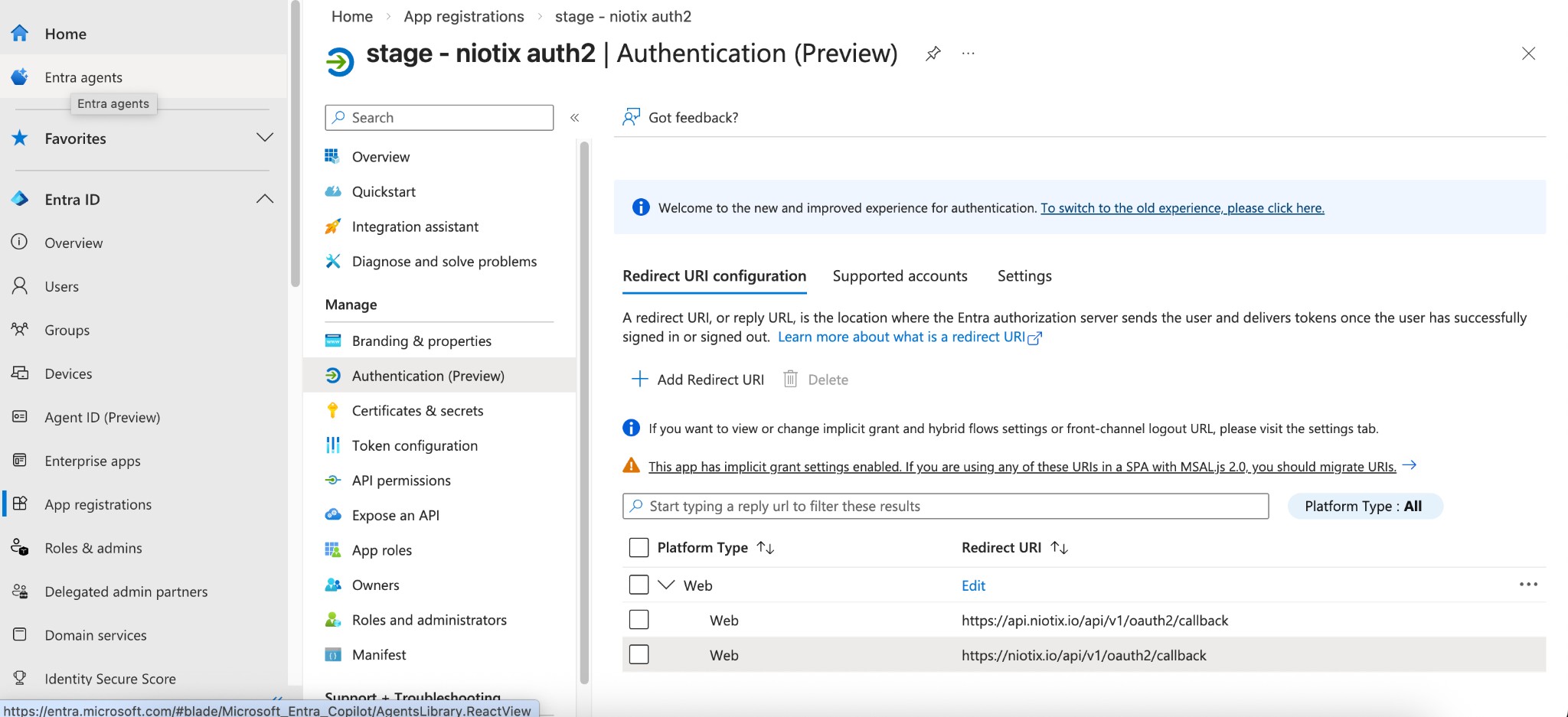
For the Outlook365 mail connector, configure a new callback URL on your frontend domain. The new domain can be set additionally to the existing domain already before the new release.
Before:
https://api.niota.io/api/v1/oauth2/office365/callback
After:
https://{yourdomain}/api/v1/oauth2/office365/callback
Default (standard niotix domain):
https://niotix.io/api/v1/oauth2/office365/callback
Detailed guidance for self-hosted niotix deployments will be published in the coming days.
All other APIs remain fully operational and are not affected by this change.
niotix REST API: https://xapi.niota.io/xapi/v1/
niota 1.x IoT Hub REST API: https://niota.io/api/
Unofficial frontend API: https://api.niota.io/api/v1/
16. February 2026
In diesem Release werden folgende Verbesserungen eingeführt:
29. January 2026
This release introduces the following improvements:
15. January 2026
08. January 2026
10. December 2025
13. November 2025
12. November 2025
5. November 2025
27. October 2025
27. October 2025
15 October 2025
Extended filtering options for Virtual Devices: “NOT” operator
When working with large inventories of Virtual Devices, filters are used to narrow them down based on attributes — for example, for bulk editing, exports, or creating smart groups. Until now, it was not possible to explicitly exclude devices, such as all that are already assigned to a device template. This made identifying open processing cases more cumbersome.
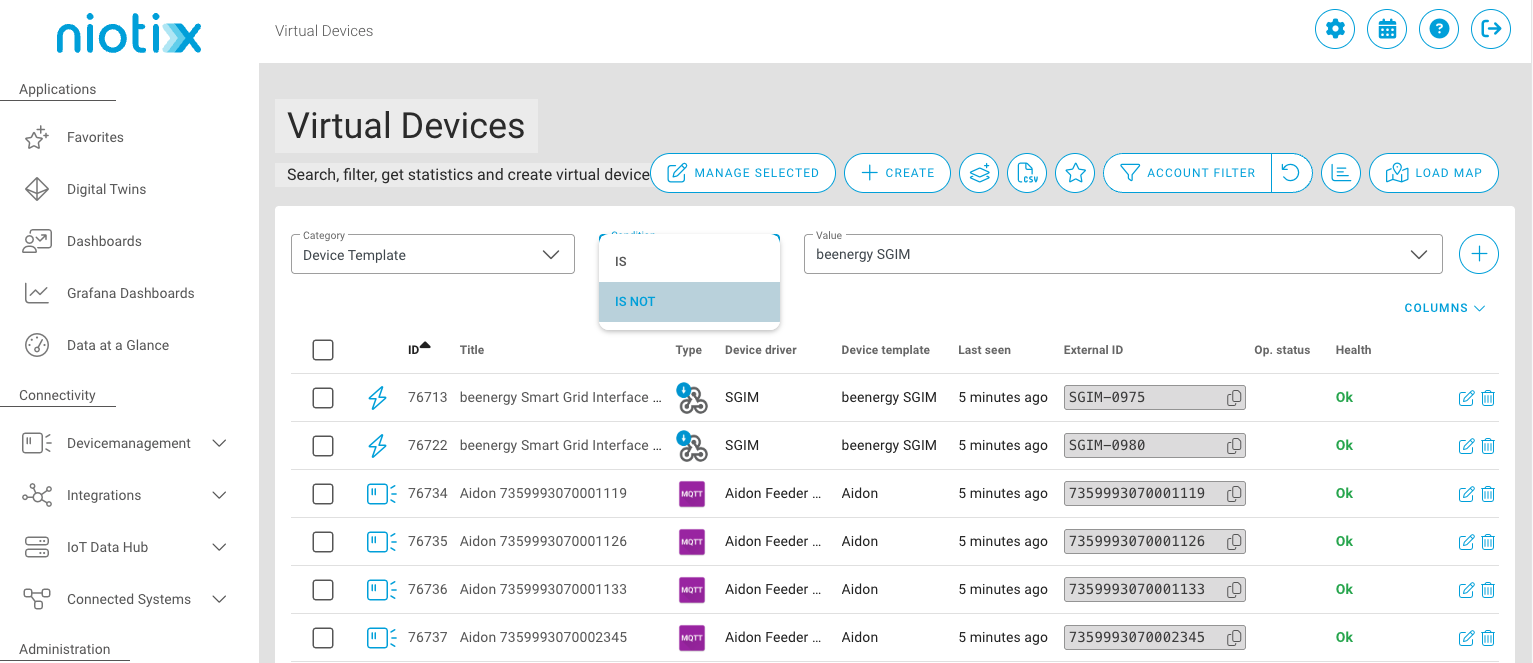
The “NOT” operator is now available. This allows you to explicitly exclude devices and use filters even more flexibly. For example, you can efficiently identify devices that are not yet assigned to a template and include them in bulk operations.
OAuth support for Office 365 (Microsoft Exchange) mail connectors
Microsoft will discontinue traditional username/password authentication for sending emails via Office 365 and Microsoft Exchange in April 2026. Systems that continue using this method will no longer be able to send emails through Microsoft mail servers. This affects, among others, notifications, alarms, and automated system emails.
Niotix now supports authentication via OAuth. This ensures that email delivery via Office 365 and Microsoft Exchange remains secure and seamless after Microsoft’s transition.
Documentation: Instructions for setting up a mail connector with Service Outlook365(OAuth2)
Support for deviceStatusReq MAC Command
Some LoRaWAN sensors transmit important information — such as battery status or link quality — only when the network server first triggers a DeviceStatusRequest. Without this targeted query, essential operational data remains invisible.
With Firefly version 1.29.0, the corresponding MAC Command is now available. Through niotix, you can configure this behavior for devices connected via a Firefly connector. This enables regular and reliable retrieval of battery status and link quality — providing greater transparency in your IoT operations.
Support for “Shape Files” in map widgets on dashboards
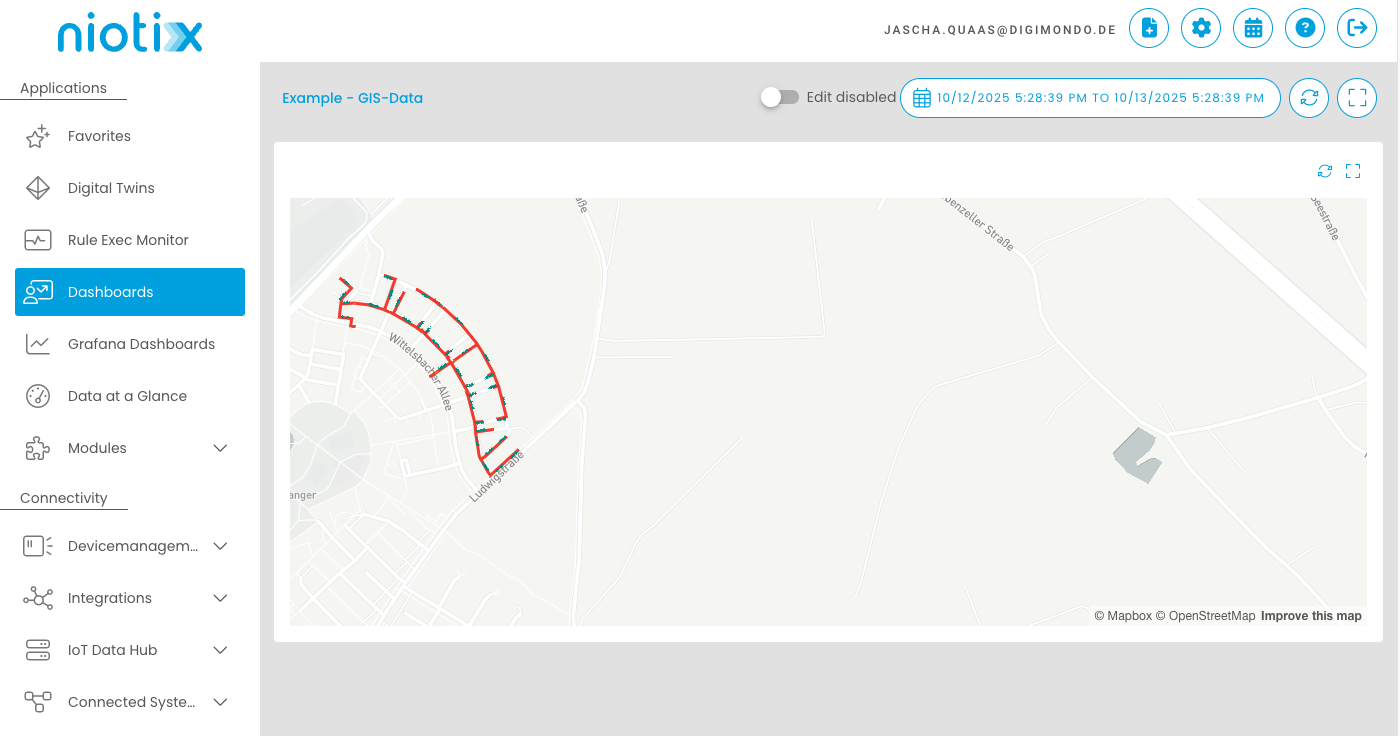
With update 3.6.0, it is now possible in our SaaS environment to embed “Shape Files” into the twin map widget on dashboards. This allows, for example, the integration of data from GIS systems.
Disabling connectors
Connectors can now be enabled or disabled via the user interface.
29. September 2025
15. September 2025
2. September 2025
20. August 2025
15. July 2025
3. July 2025
25. June 2025
Performance Improvements
Targeted performance measures have significantly reduced response times – particularly for queries in Grafana dashboards.
Internal Optimizations
Numerous dependencies have been updated, and extensive maintenance work has been carried out to further enhance the platform’s stability, security, and maintainability.
Minor Usability Enhancements
Additionally, minor usability improvements have been implemented in the area of error handling when creating virtual devices – both manually and via CSV import. These changes improve clarity and robustness in these workflows.
12. June 2025
3. June 2025
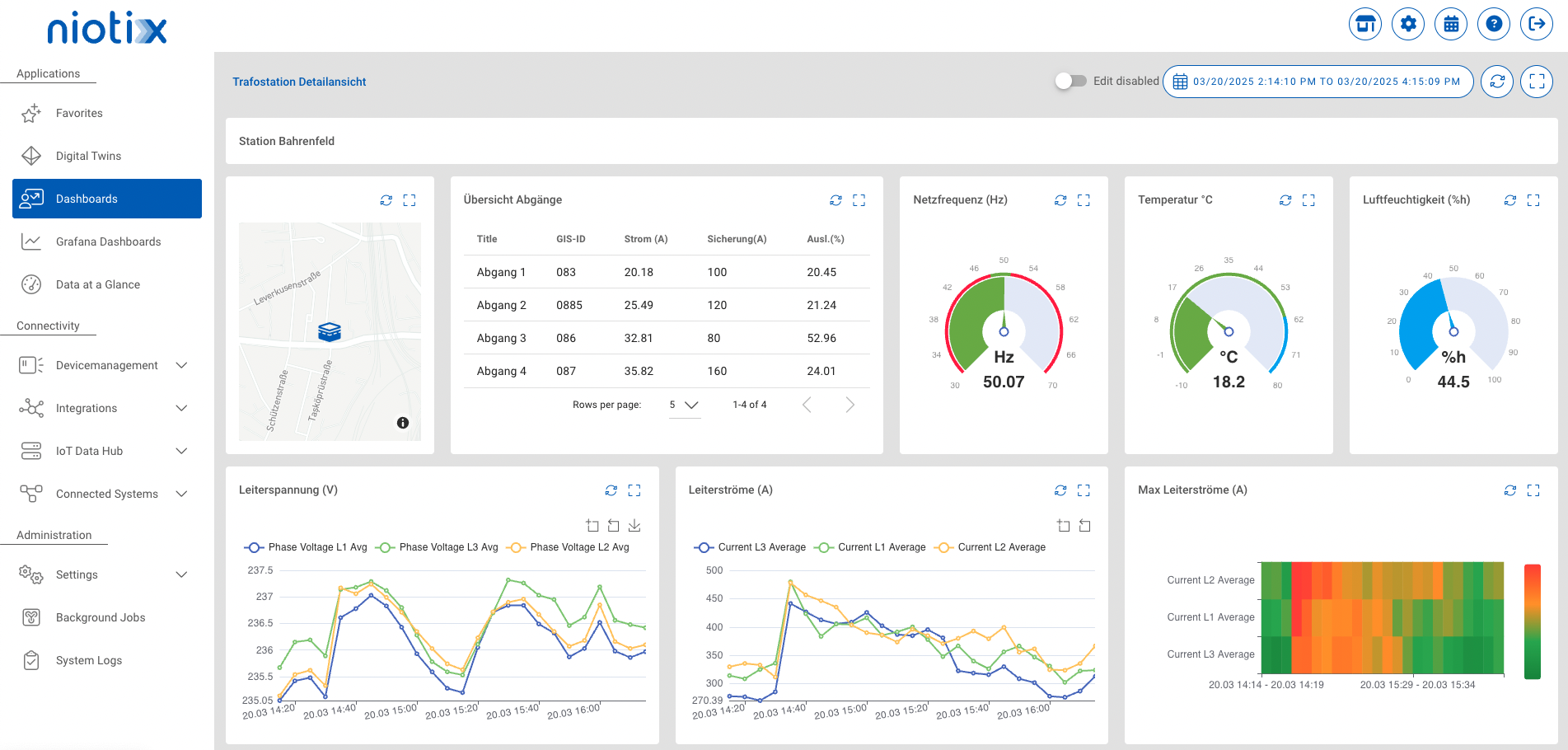
Dashboards (open beta) - Link to documentation
With this release the new dashboard functionality goes public. The use case–oriented visualization of collected measurement data is significantly enhanced. In addition to the existing visualizations in the Digital Twin dashboard and Grafana, it is now possible to create overarching dashboards with appealing diagrams. This allows information to be presented in a clear way while still offering “drill-down” options to explore details.
Certificate-Based authentication for MQTT now available Starting with this release, our MQTT Incoming Connector supports certificate-based authentication in addition to username and password. Supported are server certificates, client certificates, and client keys.
Bulk deletion of Virtual Devices now available Starting with this release, virtual devices can be conveniently deleted in bulk – allowing you to remove hundreds of devices with just one click.
15. May 2025
13. Mai 2025
24. April 2025
14. April 2025
7. April 2025
4. April 2025
27. March 2025
27. March 2025
26. March 2025
Dashboards (closed beta) - Link to documentation
With this release, the use case–oriented visualization of collected measurement data is significantly enhanced. In addition to the existing visualizations in the Digital Twin dashboard and Grafana, it is now possible to create overarching dashboards with appealing diagrams. This allows information to be presented in a clear way while still offering “drill-down” options to explore details.
Nested Dashboards: This feature makes it possible to provide an overview—e.g., of all transformer stations—while at the same time displaying the performance parameters of individual stations and their offshoots in detail.
Closed Beta Release: This function is available as part of a “closed beta” and can be activated upon request to the responsible Digimondo account manager, provided that there are still places available for the beta test.
Dynamical Datarouting - Link to documentation
In large-scale applications with a high number of sensors, data contextualization presents challenges both during operation and implementation. Often, it is already known which objects (e.g., properties, transformer stations as digital twins) exist, but not which sensors will ultimately be installed.
With dynamic data routing, the object layer can be created even before the devices are installed. After installation, the devices are simply linked to the relevant object using a freely definable “reference ID” (e.g., “Melo” or “StationID” from the GIS). This ensures that measurement data is automatically routed to and contextualized in the correct object.
This function also greatly simplifies replacement processes: when a sensor is swapped out, the new unit can simply adopt the existing “reference ID,” so the data will continue to be routed to the intended object.
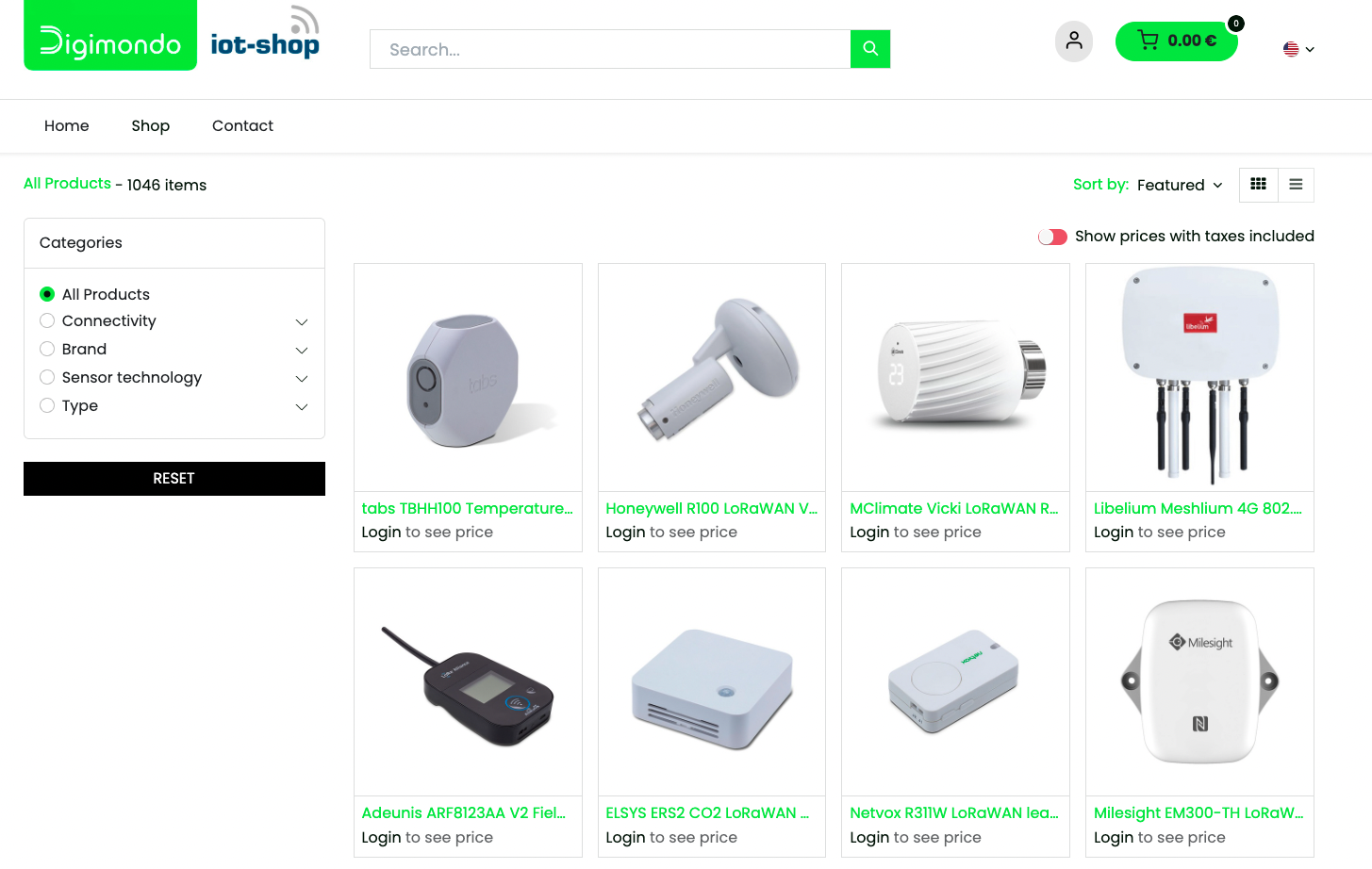
One Click to the Digimondo IoT Shop
Together with our partner Alpha-Omega Technology GmbH & Co. KG, we have been offering our own IoT shop since late last year. There, you can find hardware that can be used directly with niotix. Now, the shop is even easier to access: simply click the new button in the header and you’ll be on your way to finding the right device for your IoT project.
CSV Export: New Features
The existing CSV export functionality has been enriched with several new features:
Lightweight M2M via NBIoT or LTE in the Connectivity Portfolio - Link to documentation
With Lightweight M2M, we are introducing a forward-looking standard into our connectivity portfolio for multi-connectivity metering. This protocol offers numerous advantages, including simple sensor parameterization in the field and over-the-air (OTA) firmware updates. The new connector enables seamless device management and monitoring from within the niotix Device Management, integrated with the Lightweight M2M backend.
This feature can be activated upon request through your Digimondo contact.
09. April 2025
04. February 2025
22. January 2025
Performance improvements (Lambda Service)
15. January 2025
When creating digital twins, the “Re-use parent scope” option is activated by default with this release. This prevents an unnecessary number of permission scopes from being created. The option can be adjusted during creation. If a separate permission scope is subsequently required, this can be created in the “Meta information” tab of the digital twin using the “Create permission scope” button.
This release introduces the following improvements and fixes issues:
08. January 2025
Performance improvements
11. December 2024
05. December 2024
04. December 2024
27. November 2024
18. November 2024
11. November 2024
24. October 2024
16. October 2024
14. October 2024
10. October 2024
7. October 2024
2. October 2024
Several database queries have been optimised to improve performance.
25. September 2024
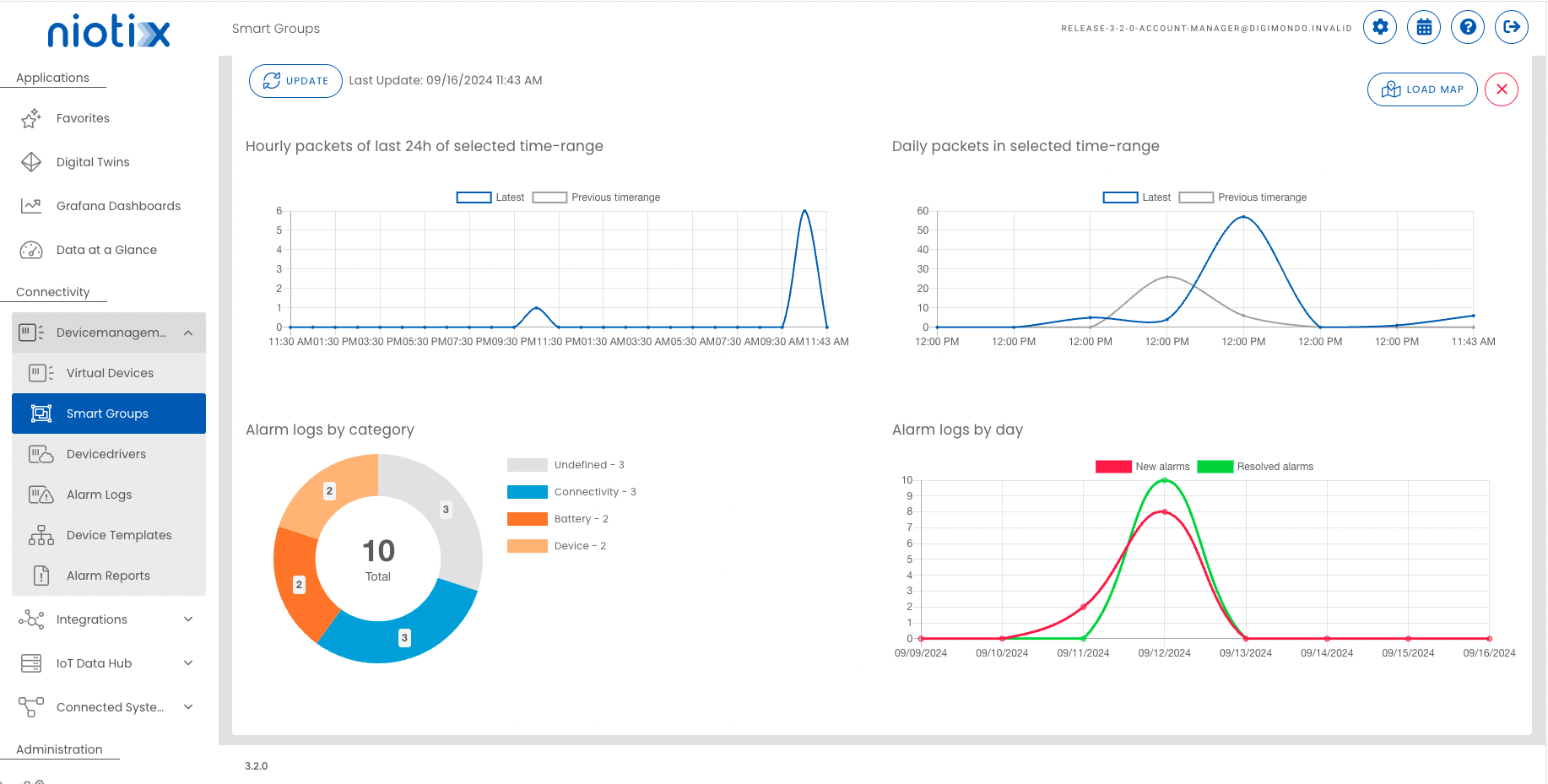
New device status statistics for Smart Groups:
Two statistics have been added to the Smart Groups dashboard to provide a better overview of the type and time of occurrence of sensor faults:
Numerous improvements for CSV export
Numerous improvements have been introduced for the CSV export of data for Digital Twins or Virtual Devices:
Extension of the functionality of templates for Virtual Devices
As announced, the Device Templates introduced with the last release have been supplemented with additional functions that make it easier to use the Device Templates for large numbers of Virtual Devices:
Active Directory support via OpenID Connect User management via Active Directory is now supported. With the introduction of OpenID Connect, which is based on the OAuth2 standard, it is possible to integrate user information centrally from your Active Directory. OpenID Connect is a widely used standard and is supported by services such as Azure Entra, among others.
New authorization to hide Virtual Device Keys Not every user who is allowed to edit a Virtual Device should also be able to view the associated keys. For this reason, the authorization to view these keys for Virtual Devices is linked to a dedicated authorization “VirtualDeviceKey.read”. Users whose roles do not have this authorization cannot view sensitive device keys (e.g. AppKey for LoRaWAN or AES key for wM-Bus). This authorization is automatically added to existing roles that were previously able to see these keys, so that no change occurs for existing users until the authorization is revoked by an administrator.
The source_identifier tag in Influx is stored in the same way as entered in the External Id field of the Virtual Device. Until this point it was in lower case for all system states (_parsed, _raw) and upper case for all other states.
If you have any queries to Influx for example from Grafana you can change the query to be case insensive by using (?i). Example: SELECT mean("value_number") FROM "states_history" WHERE ("source_identifier" =~ /(?i)Release-3-2-0/) AND $timeFilter
09. August 2024
30. July 2024
24 July 2024
17 July 2024
16 July 2024
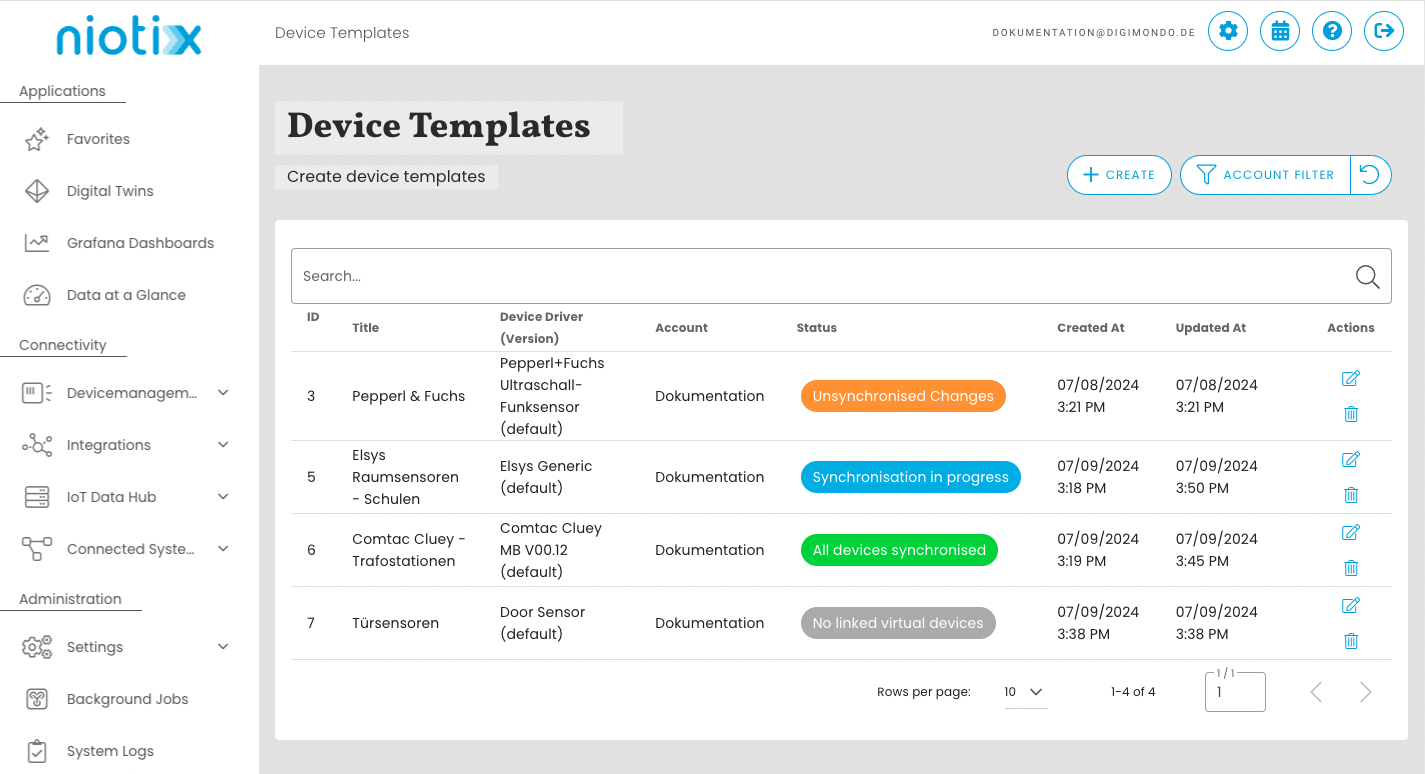
Device templates for virtual devices
Manage the configuration of your sensors uniformly, consistently and from a central point. The new device templates open up new possibilities and increased efficiency when mapping large use cases.
Advantages at a glance:
The feature will be introduced with release 3.1.0 and is currently in beta status. However, we do not expect any major bugs/changes to the functionality. Nevertheless, for large use cases, we recommend waiting until the beta status has been cancelled before using device templates. This is planned for the beginning of August.
There are also restrictions in terms of functionality: it is currently only possible to link new virtual devices to a device template when creating them. Linking existing virtual devices and mass creation via csv import will be available with the next update.
Link to the device templates documentation
Alarm reports
In use cases with a high number of devices, a large number of alarms are generated by devices and infrastructure that need to be automatically integrated into fault clearance processes as required. Alarm reports solve this problem by filtering the alarms from the devices precisely and aggregating them in a report or providing alarms from the monitoring of the package quantity to the responsible persons by e-mail.
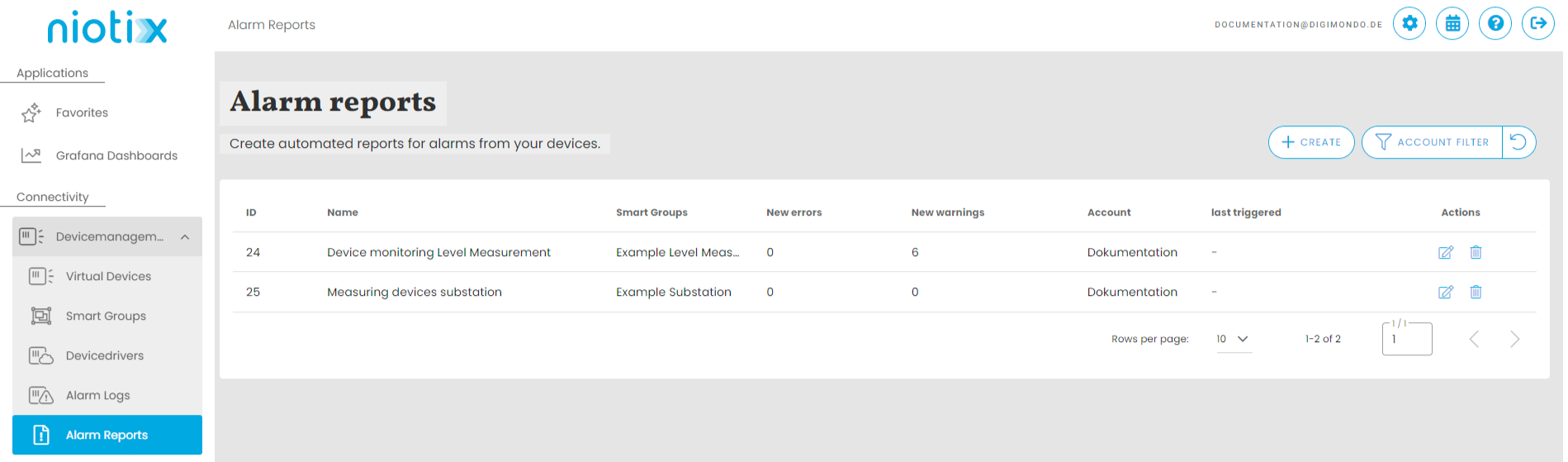
Link to documentation alarm reports
Threshold values for expected parcel quantities per Smarter Group
Threshold values can now be defined for each Smarter Group to monitor parcel quantities. If the quantity falls below this threshold, an alarm is generated, which can also be sent to the responsible persons as an e-mail alarm report.
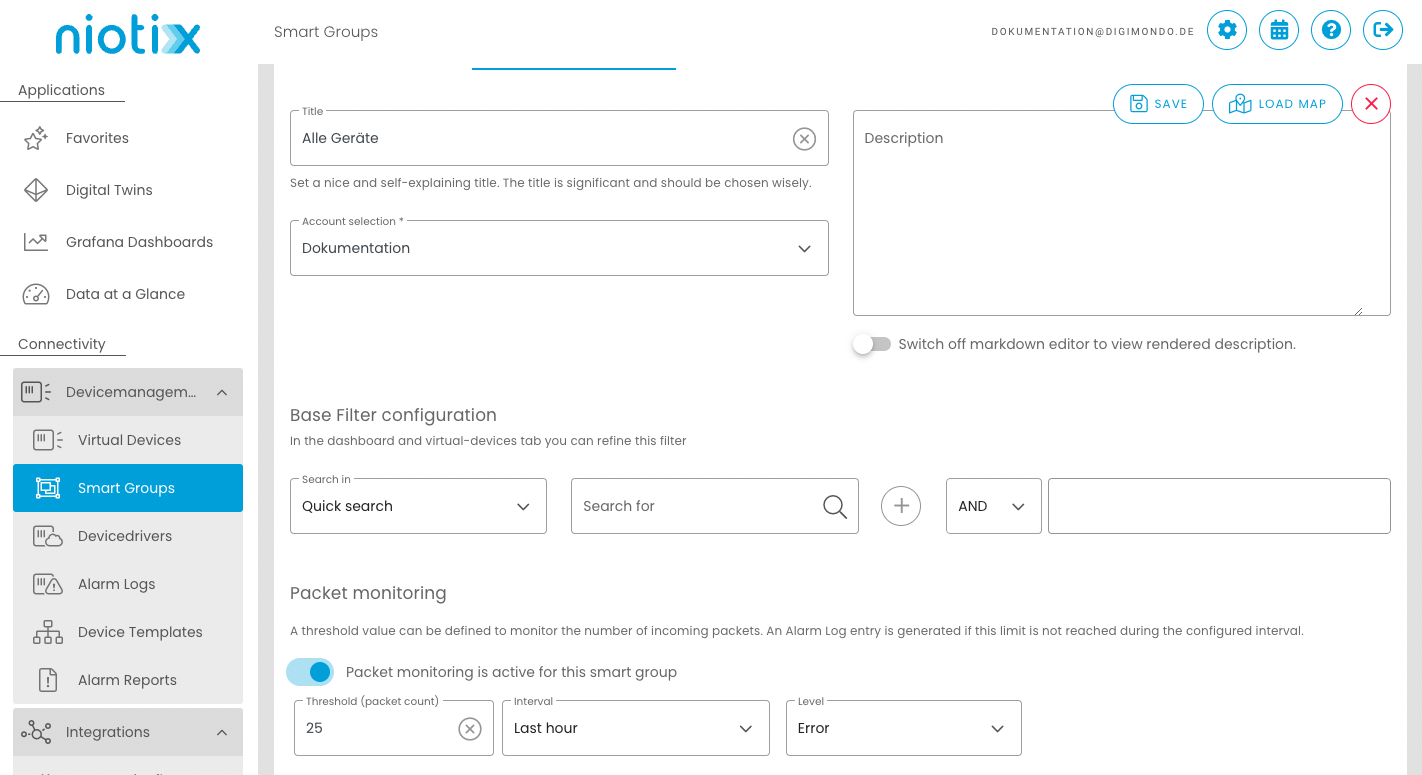
Link to the Smart Groups documentation
Event for new/resolved alarms in integration flows
A new event for alarms is available for real-time notification of critical errors. This event can be used, for example, to send messages in Microsoft Team, Slack or other systems for the central monitoring and alerting of infrastructure errors.
Link to integration flows documentation
Improvements to the code editor
The code editor has been optimised in many places in the system and now allows the use of console.log(). Error highlighting has also been optimised.
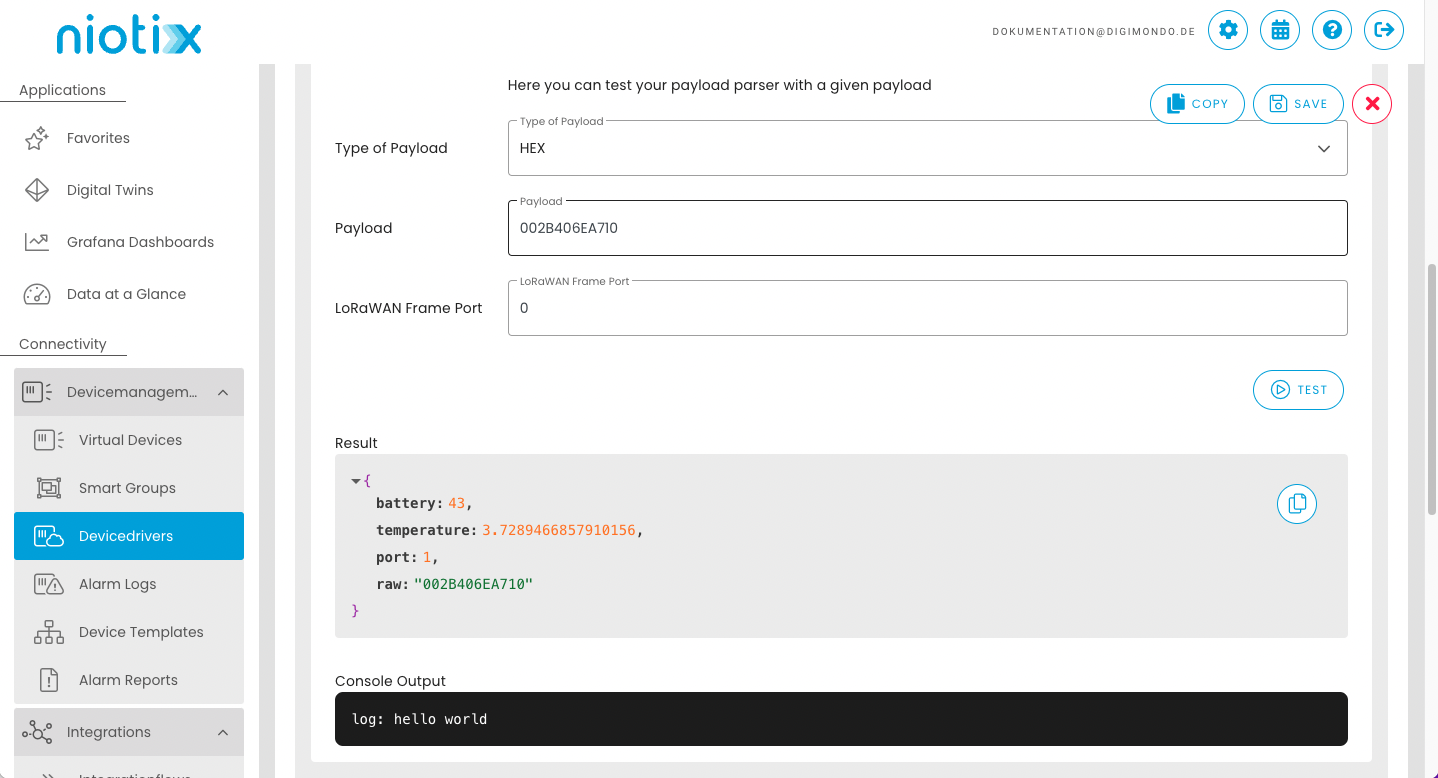
Synchronisation of device drivers in virtual devices without deleting data points
In the past, when synchronising a device driver, all data points associated with the driver were deleted and recreated, which meant that the history of the previous data could no longer be viewed on the new data points. This behaviour has been adjusted in this release so that data points are only updated and new data points are created. Existing data points are no longer deleted.
03 July 2024
25 June 2024
12 June 2024
June 10, 2024
Introduction of devicedrivers for virtual devices
Version 3.0.0 introduces devicedrivers that replace the previous devicetypes for virtual devices. From this version onwards, devicetypes can only be used for devices from the IoT Data Hub. The reason for this change is the different functionality of virtual devices and IoT Data Hub devices. The separation will enable the desired optimizations to the functionality for virtual devices in the future. With this release, all devicetypes, with a few exceptions (see list below), will be migrated to devicedrivers so that they can continue to be used for new and existing virtual devices. All virtual devices will be automatically converted to devicedrivers. We have carefully tested this conversion in various constellations. Nevertheless, please check your virtual devices randomly after the release and report any problems via our helpdesk.
The following important changes should be noted due to the switch to devicedrivers:
“Predefined parsers” will no longer be available for devicedrivers. Existing devicedrivers will be automatically converted to “function or URL payload parsers”.
The following “predefined parsers” are excluded from the migration and will not be converted automatically (if you use one of these device types, a customer advisor will contact you):
– Abeeway Industrial Tracker
– Cyble4IoT/G3 Software DS51
– Cyble 5 (Itron)
– Parametric Radar People Counter Indoor PCR2
– Sensing Labs SenlabH
The following functions will be supported for the next 6 months and then removed (deprecation):
– Creating/updating virtual devices via the XAPI (xapi/v1/virtual-devices): Here the creation can still be done with “deviceTypeId”. DeviceDriverId is used in the background. The IDs of previous devicetypes for device drivers are kept identical during migration. Please adapt your integrations so that they use deviceDriverId.
– Data from Influx: here, parallel to the new “device_driver_id” tag, data is also written to the existing “device_type_id” tag. Please change queries on dashboards or via the API so that they use “device_driver_id”.
– Integration flows: in parallel to the new “device_driver_id” attribute, the existing “device_type_id” attribute is also written here. Please adjust filters so that they use device_driver_id and make sure that target systems do not continue to use “device_type_id”.
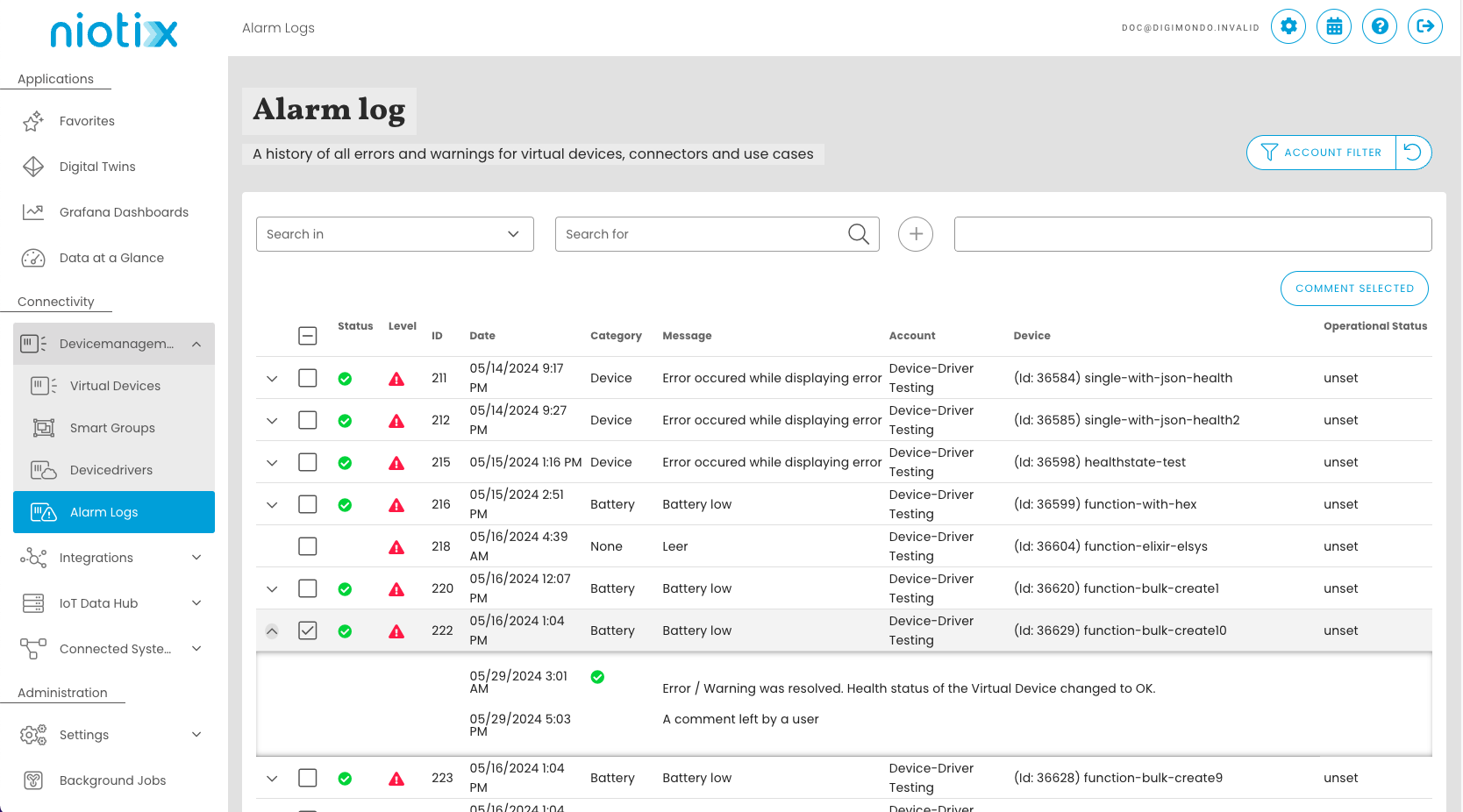
Alarm protocols for virtual devices
The “Device status configuration” can be used to define when a device should report a warning or an error for virtual devices based on flexibly definable criteria. The warning and error are noted as an entry in the alarm log. This makes it possible to see at a glance which devices were added at what time. In addition to many filter options, it is also possible to comment on these entries, for example to add a link to a troubleshooting process. In one of the upcoming releases, this alarm log will form the basis for further alarm reports with which information from the alarm log can be actively sent by e-mail.
23. May 2024
14. May 2024
2. May 2024
29. April 2024
25. April 2024
24 April 2024
23 April 2024
17. April 2024
Smart groups and package statistics
The smart groups have been extensively expanded and are now the central access point for projects and use cases in niotix. In addition to additional information, such as a description and file attachments, smart groups now offer a map view and access to the individual devices in the use case. Aggregated packet statistics and KPIs have been introduced as a major new function, which now enable a comprehensive analysis of the transmission behavior of a large number of devices and can be flexibly adapted. Filter criteria can be adjusted and devices can be filtered by data source or operating status. Packet statistics can be used to easily identify unusual transmission patterns. A new XAPI endpoint can also be used to export statistical data for multiple accounts, enabling solution providers or resellers to offer usage-based pricing models, for example.
In order to be able to display the statistics for large numbers of devices while maintaining short loading times, a specially developed data storage system was introduced. This will only be filled from the release and the data for statistics will therefore only be available from the release.
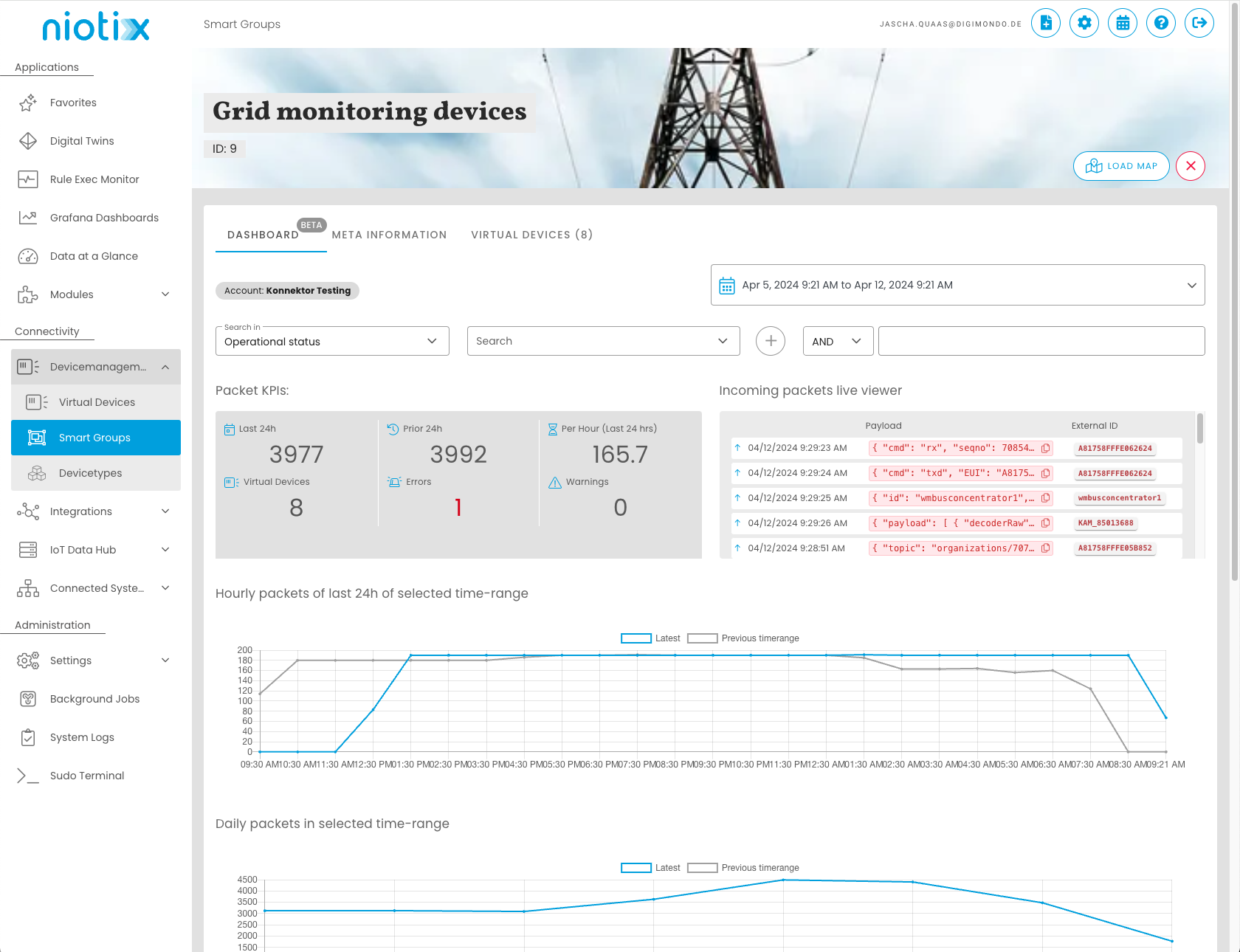
To the help article - Smart groups
Wireless M-Bus decoder
The Wireless M-Bus Decoder is a new, separately available module in niotix. The module enables simple decoding and decoding of wireless M-Bus messages (wM-Bus), which are sent from a wM-Bus concentrator to niotix via a connector. The wireless M-Bus decoder decodes the specified fields from the OMS message, regardless of the manufacturer of the device. In addition, specific fields from various manufacturers are supported for particularly easy integration. Advantages:
If you are interested in this module, please get in touch with your contact person.
To the help article - Wireless M-Bus decoder
Address information on the state change object in integration flows
The state change object in integration flows has been expanded to include the “geolocation” object, which contains the address and location information of a virtual device or digital twin:
"geolocation": {
  "latitude": 71.17092,
  "longitude": 25.783081,
  "address": "Storgata 78, 9008 Tromsø, Norway"
   }
Retention of filter settings in the virtual device overview
Filter settings made in the overview of virtual devices are retained if you leave the overview, for example to edit a device, and then return to the overview page.
Use all data states of a virtual device/digital twin in the command of rules
Previously, only data states that were also used as metrics for the evaluation of the rule could be used in the rules for the commands. This often led to data states being used as metrics for the evaluation, although this was not necessary in order to be able to use them later in the command. As of this release, all data states of a digital twin/virtual device are available for use in the command.
New options for time-aggregated data states
The update provides the new options “This hour”, “This day”, “This week”, “This month” and “This year” for time-aggregated data states with the operation “Difference to last period”. For example, calculations for the current monthly consumption can be created and visualized in no time at all.
Rate limit for outbound connectors
Optional rate limits can now be defined for the Webhook (outgoing), MQTT (outgoing) and Mail connectors.
Dynamic URL/topic structure for webhook/MQTT in integration flows & rules
In integration flows and rules, the topic structure can now be dynamically adapted for webhook (outgoing) and MQTT (outgoing) connectors using the available meta information. Example:
http://webhook.to/{{account_id}}/{{dtwin_id}}/process/
Duplicate export schedules
To adjust export schedules for CSV exports, these can now be duplicated and adjusted.
JSON mapping in function parsers In function parsers, incoming JSON can now be used and manipulated via JavaScript.
XAPI endpoint for retrieving active devices
The active devices (depending on whether a device has received data) can now be queried via GET `/xapi/v1/virtual-devices/active-devices/{account-id}. This function is used for billing or to determine the meters that need to be read manually in an application.
Categories for the device status configuration
In the device status configuration for virtual devices, a category for errors/warnings can now be optionally set. “Battery”, “Interval” & “Device” are available for selection. The categories can be evaluated with later releases in the statistics of a smart group and thus provide more transparency about which category of error/warning occurs for devices.
Received packets - statistics in virtual devices
With the introduction of the package statistics for the smart groups, the internal data management has been adapted in order to be able to display the statistics for large quantities of devices while maintaining short loading times. As of this release, this optimized data management is also used for the statistics [1] of individual virtual devices if the observation period is <= 30 days. As the new data management will only be introduced with update 2.5, no data can be displayed for the past initially, as the database must first be filled after the update. Accordingly, the statistics in the virtual device will not display any received packages for the past after the release if the period under review is <= 30 days. Select a period >30 days in the device to view the complete statistics.

Limitation of exportable lines in a csv export of digital twins / virtual devices
To prevent unwanted large csv exports with long runtimes, a limit of 500,000 lines has been configured here by default. The current limit can be viewed under Settings –> Modules –> CSV Exports Digital Twins & Virtual Devices. The limit can be adjusted by system administrators via the user interface.
14. February 2024
Thresholds(lowerLimit/upperLimit):
For measured values with data types 13 (M_ME_NC) and 36 (M_ME_TF), the “Overflow” quality flag is set if the value exceeds the “upperLimit” parameter or falls below the “lowerLimit” parameter. The data state is then set to the value of the upper or lower limit. If the “upperLimit” or “lowerLimit” parameters are not set, this function is inactive for the corresponding data state.
Validity period (validityPeriod):
For all data types with the exception of 15 (M_IT_NA) and 37 (M_IT_TB), the quality flags “Invalid” and “Not Topical” are set if the timestamp is older than the validity period (validityPeriod). For data types 15 and 37, only the “invalid” quality flag is set.
The frequency of the check is defined in the niotix IEC 104 server via the “validity-check-interval-in-s” parameter.
Online help - niotix IEC-60870-5-104
RD-6651 - IEC Connector - Add Data State Fields for Quality Flags
22. January 2023
This release introduces the following improvements and fixes the following issues:
22. January 2023
This release introduces the following improvements and fixes the following issues:
10. January 2023
This release introduces the following improvements and fixes the following issues:
RD-6784 Add validation to InfluxDB x-api-endpoint: For the endpoint /xapi/v1/influxdb/query a validation has been added. Queries must now contain a time restriction, as queries with large amounts of data without a time restriction can lead to stability problems with the Influx.
Query valid to date: SELECT * FROM "states_history" WHERE "account_id" = '42' LIMIT 5000
Query valid after the release: SELECT * FROM "states_history" WHERE "account_id" = '42' AND time >= 1704349730s LIMIT 5000
We are currently reviewing a further adjustment of the endpoint to remove this validation again and thus restore the compatibility of the previous requests.
December 2023
Überarbeitung der internen Verwaltung von Konnektoren
This release fixes the following issues:
Dezember 2023
Enhanced Features in CSV Export
With our latest update to version 2.4, we introduce enhanced functionality for the scheduled export of data from Virtual Devices and Digital Twins. Based on your feedback, we’ve further improved these features to enable more flexible data exporting. Look forward to the following new features:
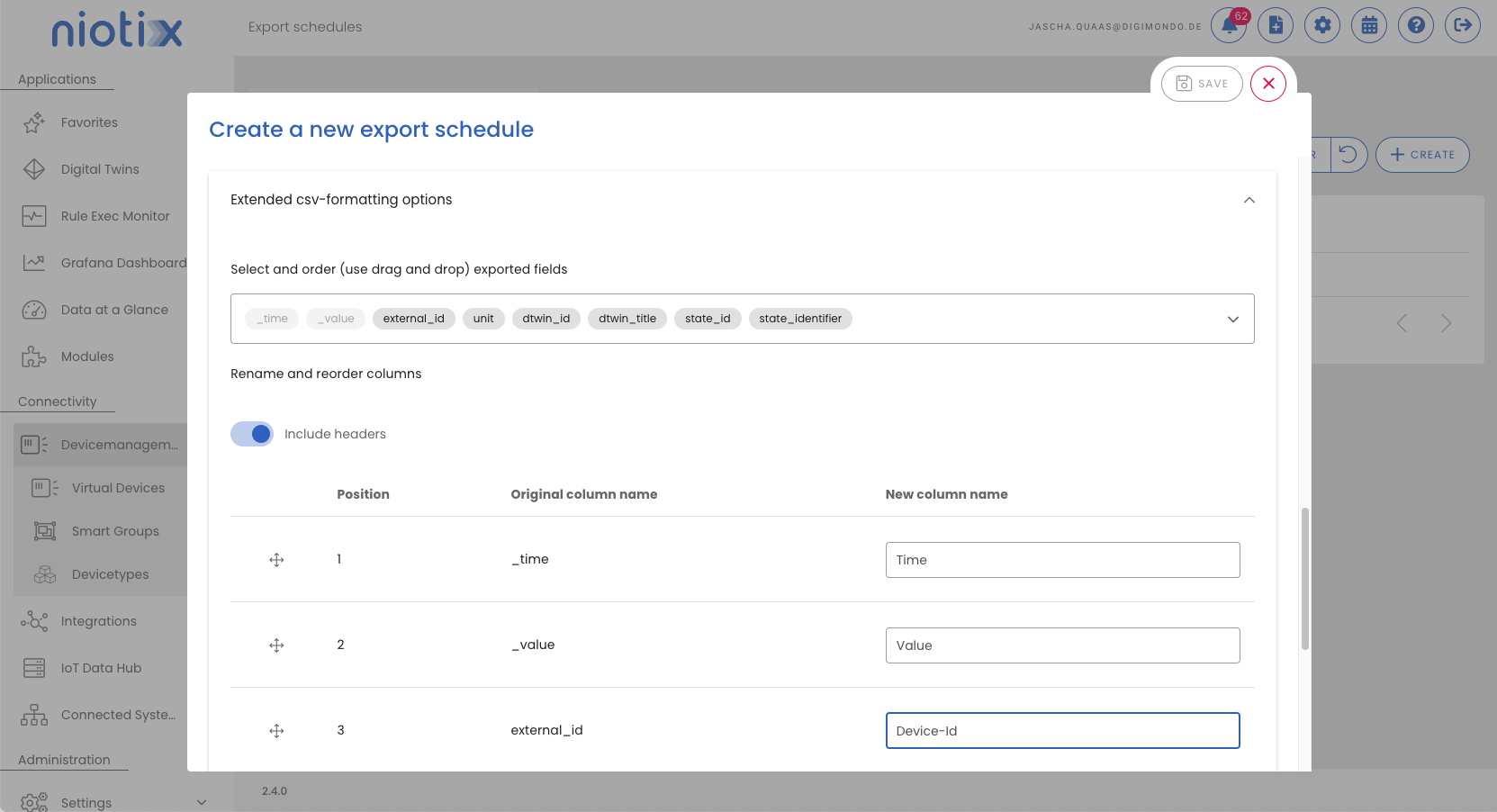
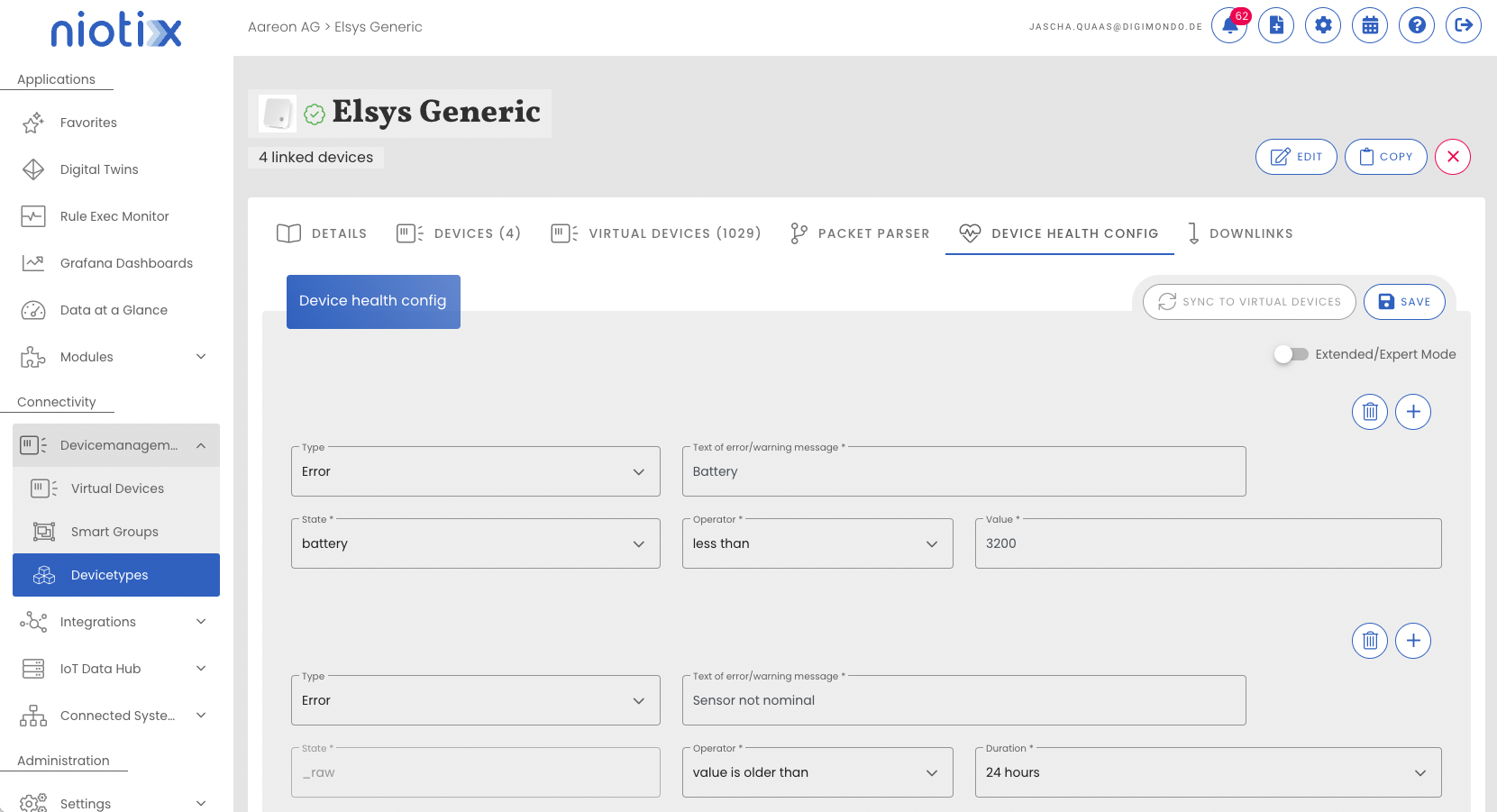
Visual Editor for Device Health State Configurations
With version 2.4 of niotix, configuring health state configurations for Virtual Devices has been simplified. Instead of the previous need for JavaScript code, a new user interface allows for intuitive and user-friendly configuration.
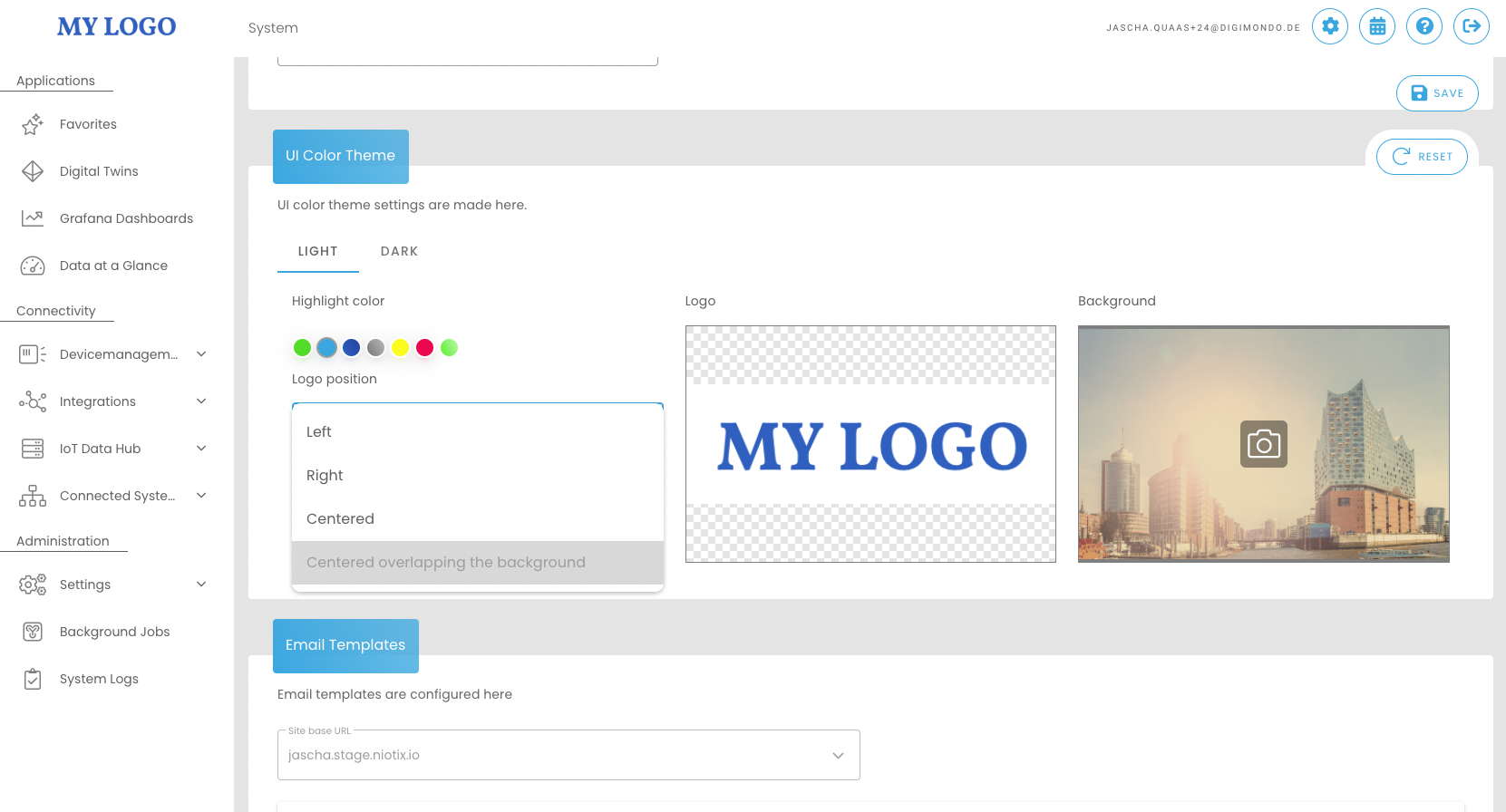
Flexible Logo Positioning on the Homepage
In version 2.4, we’re expanding the whitelabeling features of niotix to include logo positioning. Now you can place your logo not just in the top left, but also centered, centered overlapping with the background, or aligned to the right, to tailor the platform’s appearance to your preferences.
Fixed time periods for time-aggregated data states
Fixed timestamps can now be used in time-based aggregations, e.g. “Total people from the last full hour”.
Integrationflows are out of beta status
Integrationsflows have been removed from beta status with this release. As part of this change, final bug fixes were made and the final adjustment of the generated data was carried out as already announced in the release notes for 2.3.12.
Data format in the meta object for “twin-tags”, “vdevice_groups” and “twin_ancestor_ids” has been changed. Previously, this data was returned as a “csv-array” (e.g. "twin-tags" : "tag1, tag2, tag3"). With this release, this data is returned as a JSON array (e.g. "twin-tags" : ["tag1", "tag2", "tag3"]).
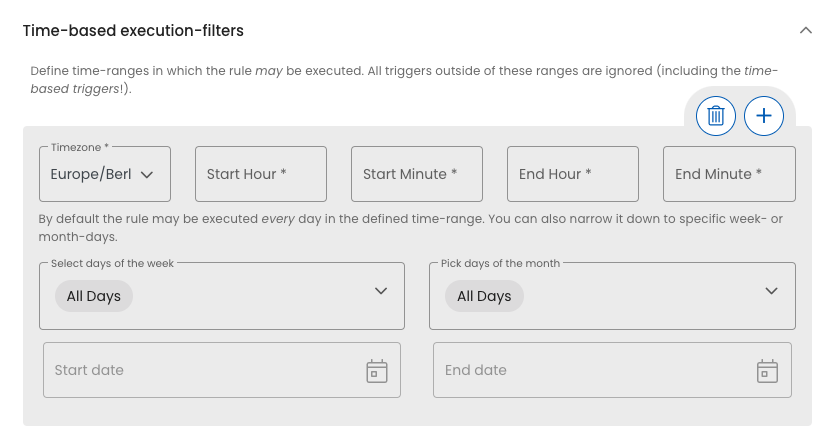
Time-based execution-filters with new default
Until now, no selection = all days. The option “All Days” has now been added here to make it easier understandable.
RD-6649 Forward csv downloadlink by webhook
RD-6594 Allow to add external id to csv export
RD-6559 Link device type in list view virtual devices
RD-6526 Add functionality from schedulers also for one time csv exports
RD-6502 Allow to export data for specific states in csv export
RD-6458 Send download link for generated file to e-mail recipients
RD-6433 Time aggregations for fixed time-ranges
RD-6379 CSV-Export: Rename columns
RD-6378 CSV-Export: Select and reorder included columns
RD-6353 Get list of unique identifiers that are available in the selected search for VD/DTs
RD-6644 Define position of the logo in the login screen
RD-6569 UI-wizzard for health state configurations
RD-6519 Create a “home account” for an user
RD-6727 Dispatcher: do not call n1 BE for predefined parser data
RD-6613 Refactor single dt/vd csv export to have the same csv structure as mass exports
RD-6548 Remove beta flag from integrationflows
RD-6431 Change example of VD bulk import “address” variable
RD-6425 Add default values to time-based execution-filters dropdowns
RD-6403 Add quickreference to - OpenWeather connector
RD-6648 Refactor current digital twin duplication to use background jobs
RD-6229 Coherent treatment of empty values in dt/vd meta for Integrationflows
RD-6583 Timestamp of aggregation update when aggregation triggered by rule
RD-6572 Public Dashboard - Predefined URL parameters
RD-6389 System logs do not show the actual user when an user is impersonated
RD-6703 Mismatch between rule exectution history and Rule overview - last triggered (date)
RD-6694 Prevent loop for rule execution if metric = aggregation state trigger
RD-6684 UI crash when user is impersonated from edit view
RD-6670 Fieldvalidation for legacy webhook outgoing red after opening
RD-6659 Rule is executed multiple times hence condition should only evaulate if “changed”
RD-6635 Rule execution history not consistent
RD-6626 Fixed error: Message Text is undefined
RD-6621 Virtual devices - CSV import error (title)
RD-6619 Coordinate history in digital twin shows position marker at oldest value
RD-6605 Incorrect link in the email notification for the CSV export (IoT Data Hub)
RD-6601 Smart Groups - Filters with OR are reset to AND
RD-6599 Rule execution history does not display executions of health rule
RD-6578 CSV Export - No Permission Digitaltwin.Read
RD-6575 Error during update (Imprint Public Dashboard)
RD-6574 Integrationflows can’t be saved after edit even though something has changed
RD-6573 Fix issues when trying to run csv-export for more then 1k devices
RD-6564 Differences between RAW and PARSED data (TTN)
RD-6556 Fix permissions for export schedules and background jobs
RD-6552 “Rows per page” in the Integrations section is not saved, but starts again and again with 10
RD-6547 User is not logged in the system logs, during virtual devices bulk import
RD-6540 Cannot edit Gateway
RD-6539 VD Bulk Import Error Message
RD-6537 Issue with notifications when creating a new user
RD-6532 Filter “Connector type MQTT(Incoming)” in virtual devices does not work
RD-6528 Aggregation functions for csv exports are not working
RD-6517 Webhook Inbound “Delete device in external service”.
RD-6494 Reset account filter not working properly
RD-6488 Error message “Unfortunately, an error occurred” appears more often
RD-6480 Deletion Virtual Devices runs into timeout
RD-6474 Error when editing gateway in gateway mgmt
RD-6428 Fix Twin hierarchy after searching for Twins
RD-6290 Only show outbound connectors in rule execution command
RD-6188 Fixing swagger POST /xapi/v1/connector Endpoint Structure
RD-6179 Rules: error when changing the *Command
RD-5104 Devices in IoT-Data-Hub always have label “niota-created”
November 2023
Refactoring of the internal management of connectors
With this release, the back-end management of connectors has been optimised to enable faster and more stable assignment.
November 2023
Custom header for webhook (outgoing) connector
Enables the setting of customised request headers in the webhook (outgoing) connector.
RD-6611 HELPDESK — rule aborts if content of {{variable}} is a string
RD-6545 HELPDESK - Error decoding the payload
RD-6536 HELPDESK - DT Copy Error: “Copy Failed”, “niotix Device was not found”
RD-6516 HELPDESK - Gateway timeouts due to incorrect parameters
September 2023
Automated csv export
In many cases, the data generated in the platform is needed for manual or automated further processing as a csv. For digital twins and virtual devices, this can now be done automatically at freely definable intervals. As the devices or twins of a use case for which the data is to be exported change over time, the export automatically adapts according to the smart filter set.
Documentation - create export schedules
This feature will be further expanded. In the next release, e.g. restriction to certain data states, sending of the download link via email and functions for automated retrieval of data from 3rd systems will follow. If you have any further wishes regarding this feature, please let us know.
Custom e-mail-address for support emails
If the niotix instance is operated for several customers and different support is to be used for different customers, dedicated e-mail addresses can now be stored at account level, which should receive the e-mails for “I like something/don’t like something” or “I have a suggestion”.
Documentation - Systemsettings
Chirpstack Connector
For the popular open source LoRaWAN network server Chirpstack we now offer a deep integration to not only use data from Chirpstack, but also to manage sensors remotely from niotix in Chirpstack. Chirpstack version 3 and version 4 are supported.
Extended filter functions for virtual devices
In order to efficiently manage a large number of devices in the system, clever filter options are required. With this release, a quick search (search in id, title, tag, group, address, external id) and a search by address have been added to the existing filter options. Individual filter criteria can now also be linked by AND/OR.
Time-based rule execution
Sending status information at a certain time, for example to inform the caretaker about the number of open windows by e-mail every day at 6 p.m., is now possible via the rule execution. A simple switch can be used to control whether the rule is to be evaluated only at certain times or also for every incoming data state. Available for rules of virtual devices and digital twins.
In addition, the execution of rules can be restricted to certain time periods, e.g. to trigger an alarm because of an open window only outside regular school hours.
Device groups are now called smart groups.
The “Device Groups” in the Virtual Devices are now called “Smart Groups” to better distinguish them from the groups that can be added to devices. In addition, the new naming should better emphasise the dynamic character that the groups have through freely combinable filter criteria.
**CSV exports from the IoT Data Hub now in the menu item “Background Jobs”.
As of this version, the CSV files created are no longer found in the header of the application, but can be accessed via the menu item “Background Jobs” in the tab “Exports IoT Data Hub”.
Aggregation direction in line charts now “forward “.
If a line chart showed data in an hourly resolution for the last 24 hours as mean values, data arriving at 10:00:01 hrs, for example, was previously shown for 11 hrs (aggegration interval 10-11 hrs). It was viewed as “backwards”. Following Grafana, the data is now integrated “forwards”, i.e. a value of 10:00:01 is now displayed for 10 o’clock.
Application of the set retention policy also to data of the time series database (States-Influx).
Data from the time series database States-Influx (data of digital twins and virtual devices NOT IoT Hub devices) are now also deleted according to the defined retention policy (default: 24 months).
Announcement - Change to the generated data format in integration flows with the release: 2.4 :
In the upcoming release we will change the data format in the meta object for “twin-tags”, “vdevice_groups” and “twin_ancestor_ids”. So far, these data are returned as “csv-array” (e.g. “twin-tags” : “tag1, tag2, tag3”). In the future, they will be returned as a JSON array (e.g. “twin-tags” : [“tag1”, “tag2”, “tag3”]). Please check integrations into your third-party systems to see if an adaptation of the data format could have consequences.
RD-5981 - Use predefined downlink configurations from devicetype for virtual devices
RD-6104 - Move Background Jobs to own Menu Item
RD-6130 - Search virtual devices by address
RD-6132 - Connect filters with AND or OR
RD-6135 - Retention policy for state influx data
RD-6142 - Move Background Jobs to own menu item
RD-6143 - CSV Export 1. Iteration – Export Multiple state values of DT / VDs
RD-6183 - Execute rules only based on time triggers
RD-6230 - Add twin_ancestor_ids as possible filter/transformation criteria and adapt example
RD-6266 - Initial version of Chirpstack connector
RD-6267 - Send downlinks to Chirpstack device
RD-6287 - Allow search in all fields
RD-6340 - Rename “Device Groups” to “Smart Groups”
RD-6355 - Calculate squaremeters per hour from consumption measurements
RD-6364 - Show account of a devicetype in tableview
RD-6411 - Allow to use vdevice_group and lastseen as values commando for rules
RD-6413 - Custom Support Mail
RD-6442 - timeaggregated states: add default timeZone and startOfTheWeek
RD-6446 - Create xapi-Endpoint to update health states
RD-6449 - Display Schedule-Settings
RD-6450 - Add Time Zone Selection to Scheduler
RD-5504 - Forge public dashboard url
RD-6008 - Performance problem: User search in subaccounts difficult
RD-6106 - Don’t allow comma and semicolon in tags and groups
RD-6108 - C&P of value preview for “Aggregate”-States not working
RD-6187 - The number of received packets does not match the number displayed in the packet history diagram
RD-6278 - Data states in VD are not loaded correctly
RD-6279 - Gateway Mgmt - no separate chart display
RD-6289 - Executing command not possible when state hasn’t been updated yet
RD-6292 - IEC 104 Push connector - edit not possible / error on create
RD-6314 - Weekly time aggregation has time offset of 2h
RD-6322 - Rules with email command –> [object Object] in email, if state is of type json
RD-6329 - Virtual Devices - adding a new device group cannot be saved properly with ‘‘Enter’’ only
RD-6331 - “reduce map”-button not working at DT/VD Details page
RD-6339 - Virtual Devices CSV Import: Error if no letter in DevEUI
RD-6343 - Link connector specific data in VD to connector detail view
RD-6344 - “Discard changes” message, but nothing has been changed
RD-6365 - Integrationflow - steps-column sometimes empty
RD-6370 - Display error of state values as json with the same timestamp
RD-6372 - Change Default state visualisation.
RD-6373 - Fold out twin hierarchy upwards
RD-6390 - Timestamp for Aggregated timeseries “Difference to last value” incorrect if several measurement points come with one package
RD-6398 — Not possible to select zone in Geofence Rule
RD-6407 – Remove indexing of LoRaWAN Region from Bulk Import Instruction
RD-6434 - Sorting in the ‘‘Announcements’’ section does not work
RD-6436 - Change “aggregation direction” for line chart visualisations and ad option “raw”
RD-6439 - Remove DTwin subtitle frame
July 2023
_parsed data state
For virtual devices, in addition to the _raw data state, which contains the raw data of the package, there will now also be another system-generated data state “_parsed”. As the name already suggests this data state contains the decoded data that was generated from the raw data according to the parser from the device type. This has two advantages:
Link metadata with measurement data
Metadata of a digital twin can now be used in the transformation of a data point. This allows, for example, relative quantities such as utilization rates to be offset directly against the measurement data on the basis of the nominal value. The nominal values can be stored in the user-defined properties of the digital twin
Optimization of the mass import of virtual devices
The mass import of virtual devices released in the last release gets new features:
RD-6022 HELPDESK — Erweiterung Log-Level digital-twin states Service
RD-6070 No highlighting for missing input when creating virtual device
RD-6086 QoS Settings for MQTT-Connector
RD-6119 Allow to use twin_category, vdevice_groups, twin_tags, twin_key_value in filter-wizzard
RD-6161 Rules: only trigger rules during specific time spans
RD-6167 hide footer-bar, when publicly shared twin doesn’t have floors
RD-6181 performAddressLookup & performCoordinateLookup for VD bulk import
RD-6236 Translate IEC Error Message
RD-6246 HELPDESK — Node-Red nur bei Berechtigung all.manage einblenden
RD-6247 put virtual devices not seen before at the end
RD-6252 InfluxDB-Service: use keepalive connections to save sockets
RD-6257 Rename MQTT connector to “MQTT (Incoming)”
RD-6269 Search vor EUI when creating new state with source virtual device
RD-6295 _parsed state for virtual devices
RD-6306 Custom properties for bulk import
RD-6307 Set icon via bulk import
RD-6316 rename background-job status “success”
RD-6127 Allow health state sync for more then 500 devices in bulk edit job
RD-6172 Cancel running/queued import Jobs
RD-5460 Sanitize Unify-Service Logs
RD-6025 Webhook(Inbound) is not working correctly for digital twin states
RD-6080 HELPDESK — Rule execution not suspended, although Throttle is set.
RD-6094 HELPDESK - Niota modules can be used without activation only with the autorization
RD-6107 HELPDESK - Add expand button to the application map
RD-6115 HELPDESK — CSV upload in the devices freezes, reason unclear
RD-6122 Autogenerated link to xapi doc wrong in some onpremise cases
RD-6139 Virtual device map view - datastate selection incoherent
RD-6140 Sort Integrationflows, Filter, Transformers & Connectors per default by Id
RD-6191 Page collapses after background job is done (Bulk edit & Bulk import)
RD-6193 HELPDESK - Filters sometimes show wrong content when opened/edited for the first time
RD-6203 HELPDESK - State diagram is always shifted by the aggregation time
RD-6212 No connection reset for firefly if mqtt url is empty
RD-6237 Description not saved at transformers
RD-6254 HELPDESK - Pre-selection “data point” should only be applied if identifier is present in this twin
June 2023
Virtual Device Bulk Import
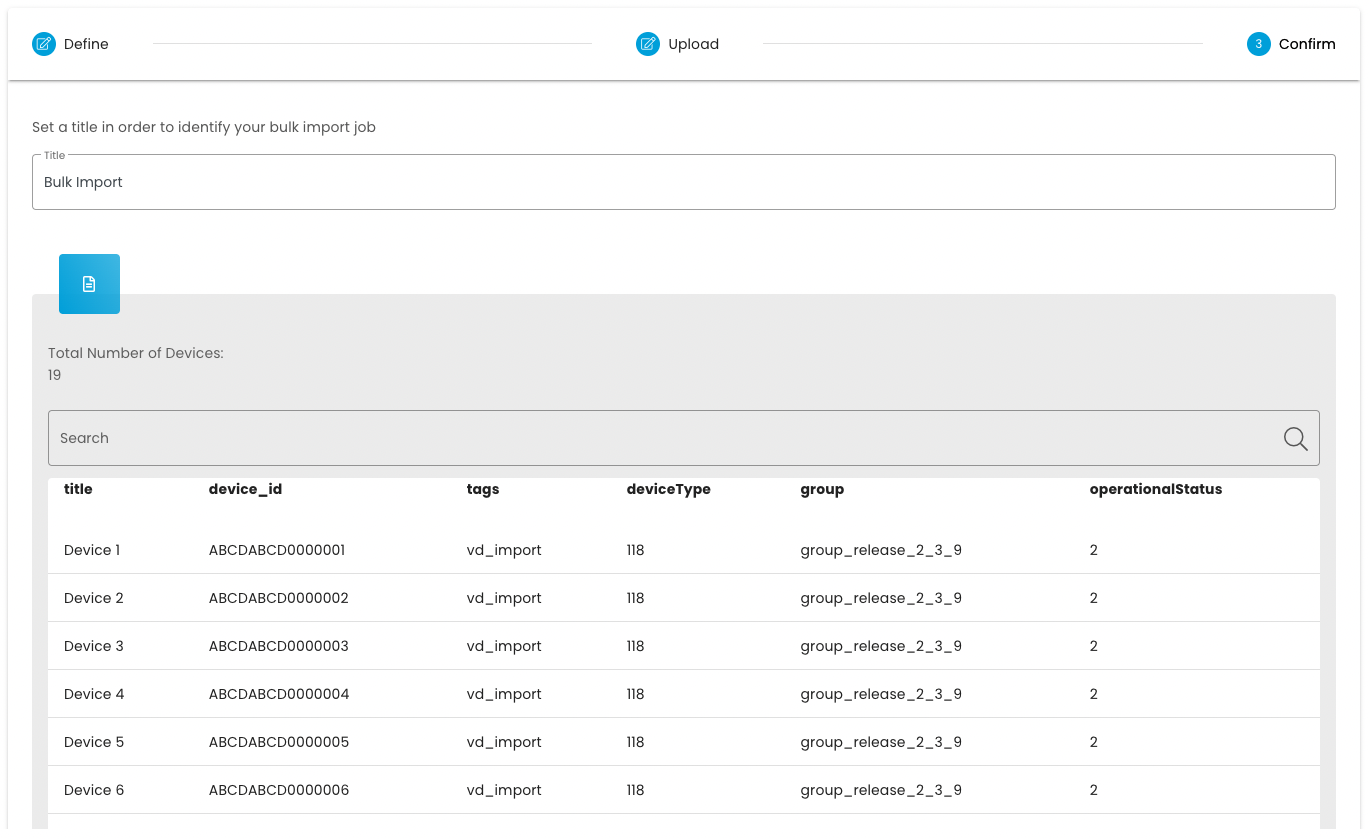
Until now, a large number of devices could only be imported via our xapi. In the future it will be possible to import up to 500 devices based on a CSV file. This will make it even more convenient to import large numbers of devices and start implementing the use cases directly.
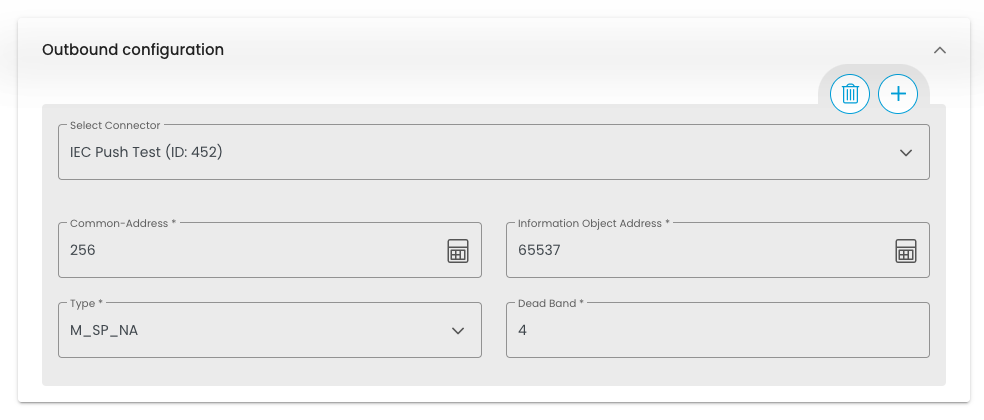
IEC 104 Push Connector for Virtual Devices & Digital Twins
With the new IEC 104 Push connector, data from Digital Twins & Virtual Devices can now also be transmitted to an IEC server and from there to the control station.
New connector for MQTT With this release it will be possible to send data from Virtual Devices and Digital Twins to an MQTT client. This makes it possible to implement and extend some new use cases.
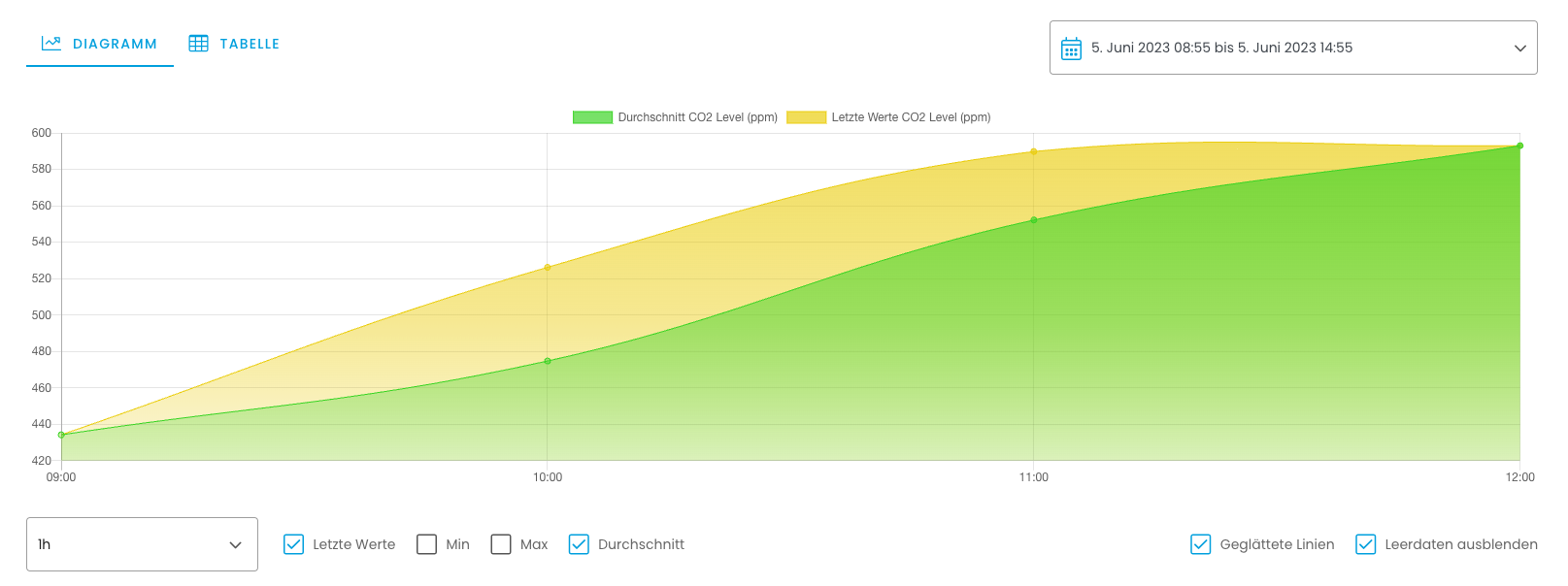
Show last value in line chart and histogram Until now, only average values or the minimum or maximum of a specified period could be displayed in line charts and histograms. Now it will also be possible to select the last value of the period.
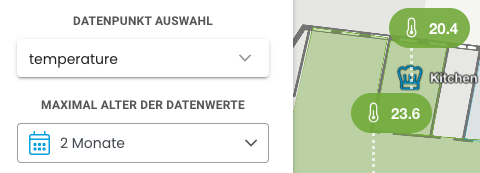
Filter data points by time in the map view Data states can often only be compared if the data is current. With the release, there will be the possibility to select the maximum age of the data states in the map view of the digital twin. All data states that are older will be grayed out.
RD-5869 XAPI: get user for an account
RD-5889 HELPDESK - Wrong Field Value from DataHub to Twin
RD-5900 Add ui-validation for target.variable in devicetype
RD-5902 XAPI: influxdb multiple queries support
RD-5919 Step 7: Update remote device if changed in niotix
RD-5922 Dedicated mqtt - outbound connector
RD-5932 Do not show passwords/api-key’s in connectors UI
RD-5936 BE/FE: Show changes of a bulk edit job
RD-5966 HELPDESK - Change the url in the “CSV Export mail”
RD-5970 HELPDESK - Add a dropdown for time zones in the data states settings
RD-5977 IEC xapi Endpoint
RD-5980 Step 8: Send downlinks to Loriot device
RD-5995 FE – Generic State Outbound Configuration UI
RD-5998 Adjustion of Connector UI
RD-5999 Enable IEC Connector as Module
RD-6003 Create concept to improve midnights job load peaks & implement improvements
RD-6004 BE - Enable IEC Connector as Module
RD-6005 Add Connector specific State Settings to Manifest file
RD-6007 Missing translations (Follow up)
RD-6009 HELPDESK - Bei NULL-Werten lösen Regeln aus muss per default deaktiviert sein
RD-6030 VD CSV Import – UI Step 1: “Define”
RD-6031 VD CSV Import – UI Step 2.1: “Upload”
RD-6032 VD CSV Import – UI Step 2.2: “Validate”
RD-6033 VD CSV Import – UI Step 3: “Confirm”
RD-6035 VD CSV Import – Step 2.2: “Validate” – BE Validation
RD-6038 Step 1: Write state data with more than 255 char to new table
RD-6039 Step 2: Change frontend to mainly read from influx
RD-6066 Extend background-runner be for csv import
RD-6067 Change all URLs to our docu to https://docs.niotix.io/
RD-6075 Remove input type from transformations
RD-6077 Translations for customisable columns
RD-6082 HELPDESK — Open Background-Jobs with first tab
RD-6084 Add account column to integration-overviews pages
RD-6088 IEC 104 - Cannot read property ‘settings’ of undefined
RD-6092 Sort job details table of bulk edits by status
RD-6093 Loading of connectors fails if amount of connectors in instance is too high
RD-6095 Take over timestamp from virtual device for digital twin states with source virtual device
RD-6109 Remove unused dependencies
RD-6111 W/m² as Type for target variables
RD-6121 New tab for bulk import jobs
RD-6123 Update BE unify dependencies to latest which only have bugfix version update
RD-6128 DB query to find devicetypes with duplicate variables
RD-6138 Make region and frequency plan optional
RD-6160 adjust instruction structure
RD-6166 remove map settings button from public dashboard
RD-6226 CSV Import: rename column “address” to “location”
RD-6227 change “limit reached” error message
RD-6051 CSV Example File
RD-4996 Connector IEC 104 Push
RD-5109 Use group of virtual devices as filter criteria & transformations in integrationflows & influx
RD-6078 HELPDESK — Display option “latest” in history and line charts
RD-6081 HELPDESK – Add relative time selector to twin map
RD-6098 Adapt IEC Push Server
RD-6165 Documentation: Display option “latest” in history and line charts
RD-6176 Add “address” as optional field for bulk import
RD-5450 Change account-name for MFA from “…@niota” to e.g. “…@[domainname]”
RD-5768 HELPDESK - Export jobs are running endlessly
RD-5868 HELPDESK — Public Dashboard of Twins deactivated in case of system changes
RD-5913 Breadcrumbs not working correctly
RD-5961 HELPDESK - Once set, email server settings in the account cannot be deleted
RD-5967 Bulk Import of users not working
RD-5994 User properties under account settings doesn’t have an impact anymore on user creation
RD-6012 Remove expand map icon from header maps
RD-6016 Change back Public Dashboard Twin View
RD-6019 Don’t hide text after clicking on “copy Config” button of data states
RD-6026 HELPDESK - Virtual devices - filtering by system status “invalid” fails
RD-6034 Can not create webhook device with id 23
RD-6036 Remove account id as option from integrationflows as data is always from one account
RD-6042 HELPDESK — WG: niota Monitoring: kritische Gateways
RD-6057 HELPDESK - When executing rules, the subdomain in the email is not considered
RD-6061 HELPDESK - xapi post Virtual Devices Example
RD-6069 Data State order does not match with dashboard tile order
RD-6074 Virtual device creations fails at dtwinGeoUpdate
RD-6087 HELPDESK — Remove button function from tags
RD-6096 HELPDESK - Virtual device page wants to be saved without any changes made
RD-6097 HELPDESK - Display “Account” in the device type does not work
RD-6107 HELPDESK - Add expand button to the application map
RD-6112 HELPDESK - Column selection changes cannot be saved
RD-6113 HELPDESK - Rule execution history cannot be opened
RD-6114 HELPDESK - VD: Rows per page are not correctly shown
RD-6125 HELPDESK - Floors displayed in “Floor Switcher” not correct
RD-6156 Filtering is reset after leaving the map view
March 2023
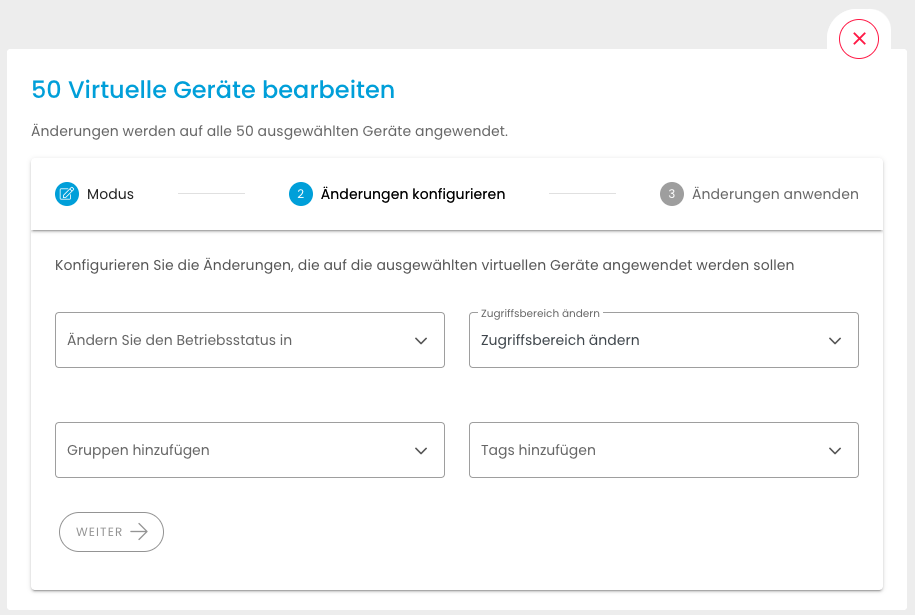
Bulk editing of Virtual Devices
Managing large amounts of data also involves editing multiple devices. With the new release it will be possible to edit up to 50 virtual devices simultaneously via the user interface. For example, it will be possible to adjust the operating status of multiple devices, or the access range of multiple devices without much effort.
Device Groups
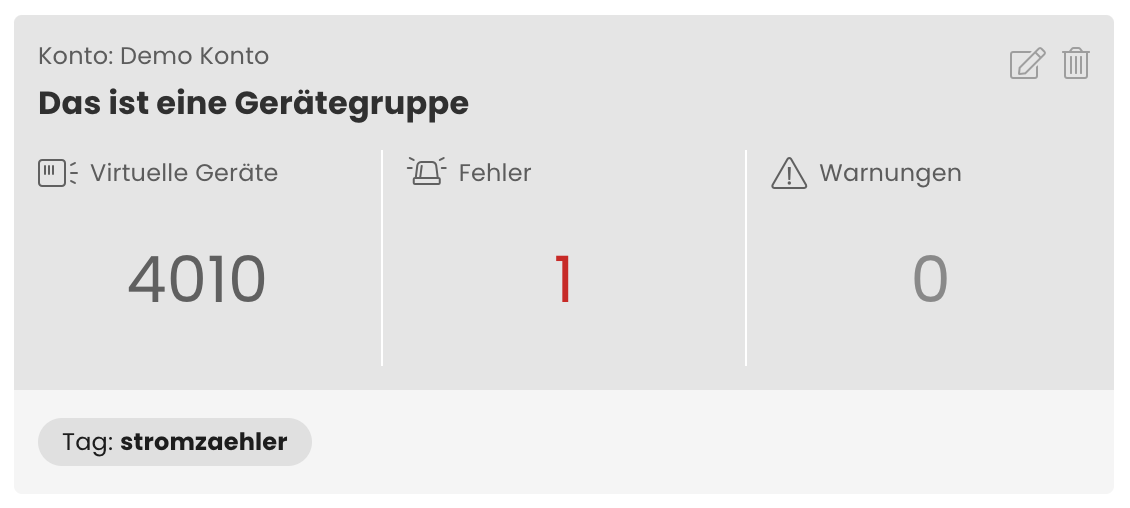
Device groups allow you to group your virtual devices according to your needs using freely selectable filter criteria. This allows you to group Virtual Devices by use case, for example, to evaluate the health status of the Virtual Devices of these use cases at a glance. Additionally, the device groups can be used as a quick entry point to a specific set of devices.
New Connector to Loriot
With the connector to the LoRaWAN network server Loriot, data can be received from Loriot without implementation effort. In addition, it is possible to create and manage devices from niotix in Loriot. Sending downlinks e.g. via a rule in the digital twin will be added with the next release.
Customisable columns in the virtual devices overview
The columns displayed in the overview table of the virtual devices can now be customised. In addition to the already known columns, the creation date, modification date, account and address are also available as columns.
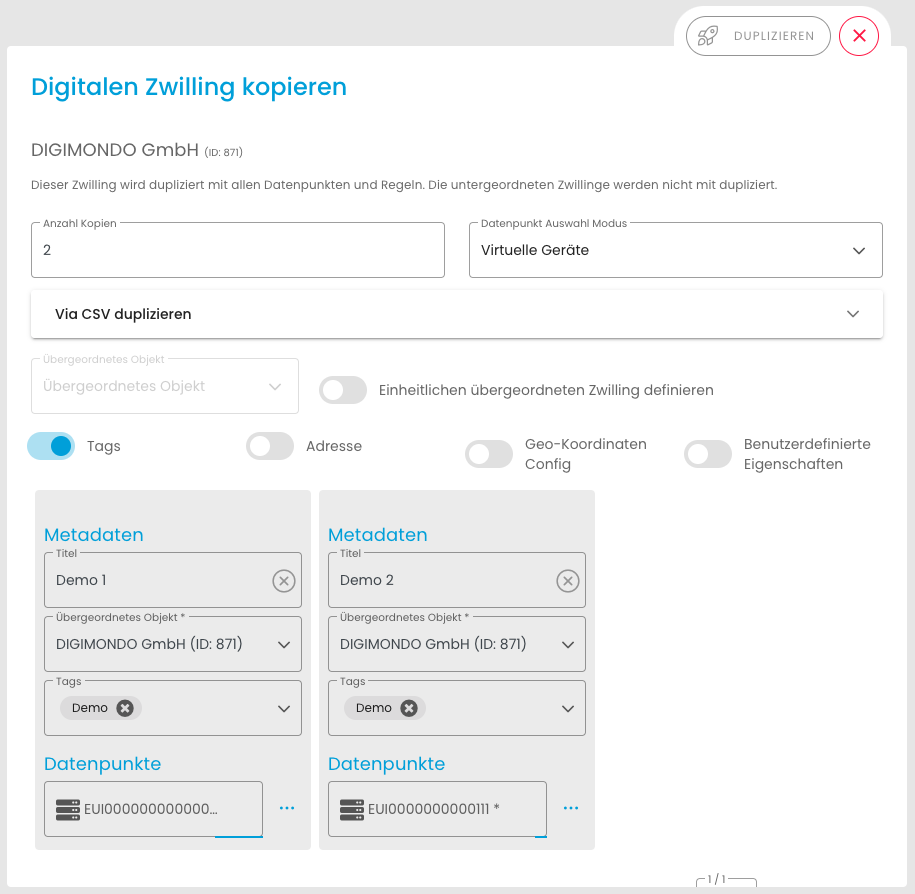
Duplicate Digital Twin
In many use cases, there is not just one digital twin, but a large number of digital twins that all have the same data points. It saves time not to have to create them all manually one after the other, but to be able to duplicate a configured twin. Once created, a digital twin can be duplicated up to 50 times per run, with each data point being assigned a new virtual device.
RD-5234 Public Dashboard: List of Twins when multiple Twins have the same location - BE
RD-5621 BE: Create API for View Overview
RD-5757 Consistently show objects of all accessible acounts
RD-5775 Dedicated errorhandling if connector of a device has an error
RD-5857 Change German text in Home Screen
RD-5865 Rename “Ikone” to “Icon”
RD-5866 Finalise monitoring views for release
RD-5873 Edit monitoring views
RD-5874 UI permission checks
RD-5879 Add allowed permissions for CRUD views and executions
RD-5882 HELPDESK - Add a note to the Node-Red documentation
RD-5886 FE: implement permission checks
RD-5887 BE: implement permission checks
RD-5888 Missing translations after refactoring - systematic analysis
RD-5892 Customisable columns for virtual device overview
RD-5893 Step 2: Add possibility to create ABP devices
RD-5899 System log entries for CRUD monitoring views
RD-5902 XAPI: influxdb multiple queries support
RD-5914 Step 4: Import existing devices from Loriot
RD-5915 Step 3: Add possibility to set frequency plan
RD-5916 Step 5: Add heartbeat and reconnect
RD-5917 Final polish bulk edit UI
RD-5920 Set configId for states with Virtual Device Aggregation for IEC 104 PUSH
RD-5924 FE: synchronise health state
RD-5926 Virtual Device Map - Filter Devices
RD-5927 VA, kVA, Var & kVar as Type for target Variables
RD-5932 Do not show passwords/api-key’s in connectors UI
RD-5935 Fix actility downlink connector
RD-5936 BE/FE: Show changes of a bulk edit job
RD-5937 Remove featureflag for bulkediting before release
RD-5938 Remove featureflag for monitoring views
RD-5939 Remove featureflag for Loriot connector
RD-5954 Virtual Device create button disappears, when searchresult is < 500 devices
RD-5959 Only show rules of twins & subtwin as default in rule overview (not related vd-rules)
RD-5975 Do not delete “manually created” datastates when syncing/changing the devicetype
RD-5997 Change instruction text
RD-6020 Remove featureflag rd-5983-connector-logs-disabled
RD-6021 Rename “Monitoring Views”
RD-6060 Bulk edit button not working
RD-5051 HELPDESK: Device deletion from Application view - Thingpark
RD-5470 HELPDESK - VD: Graphics for “Packets received in the chosen time range” does not work
RD-5690 XAPI Create VD fails, device is created in external system
RD-5749 HELPDESK - Error in the visualization of the statistics of the virtual devices
RD-5768 HELPDESK - Export jobs are running endlessly
RD-5788 e-mail-connector send mails out over different smtp server as configured
RD-5808 HELPDESK -Application map not working, icons missing; add expand button
RD-5819 HELPDESK - DT: Map does not load after changing the address of a digital twin
RD-5835 HELPDESK - User sees digital twins in the “Floor Switcher” selection menu, which he does not have access to
RD-5842 HELPDESK - Number of list entries are reset by data state view
RD-5856 HELPDESK — Duplicating Twin with IoT Hub Devices leads to Error Page
RD-5871 BE: API returns only 10 jobs, even if there are more results
RD-5876 Duplicate Twin: State options missing
RD-5878 “Same parent twin for all” is not taken over
RD-5881 HELPDESK - Change of account for connectors not possible, despite success message of the system
RD-5901 HELPDESK - /xapi/v1/accounts pagination not working
RD-5908 Fix create bulk edit jobs via frontend
RD-5925 HELPDESK - Open Grafana and Node Red error message (only in Firefox)
RD-5957 deviceTypeSync remains true for a device after saving
RD-6013 Device import for TTN connector not working
RD-5773 Evaluation: customizable columns for virtual device overview table
RD-5867 Forwarding to the Virtual Device List
RD-5982 Save customise columns into browser storage
Februar 2023
Custom Terms & Conditions
Starting with the next release, we will offer account admins the possibility to define their own terms & conditions in order to include their own individual agreements.
In addition, we will again make minor general optimisations and improvements.
RD-5307 Wording: Adjust map name “niota” to “niotix”
RD-5694 create bulk edit job at background-runners
RD-5733 process changes for changes of operational status
RD-5758 Allow semicolon and comma as separator for duplicate twin csv
RD-5764 Change color of “Use Custom T&C”-Toggle Button due to system color
RD-5766 Handle special characters in identifiers of data states
RD-5789 Public Dashboard: List of Twins when multiple Twins have the same location
RD-5803 Set Strings into quotes for Duplicate Twin
RD-5904 Filter virtual devices by connector type timeouts
RD-5725 IoT Hub, change default Authentication from ABP to OTAA
RD-5729 Virtual Devices, change default Authentication from ABP to OTAA
RD-5760 Autogenerate EndDevice ID when creating Things Stack - Virtual Devices
RD-5804 Add PATCH as method to Webhook(Outgoing) - Connector
RD-5806 Set skip framecounter increment check to false by default
RD-5436 User editing: Add validation for user properties
RD-5751 HELPDESK - Dead link for On Premise systems
RD-5772 Create coherent “confirmation” dialogs on deletion of integrationflows, filters and transformation
RD-5776 HELPDESK - Error report for Gateway Management
RD-5781 Webhook url wrong in some cases
RD-5785 HELPDESK - REST API: DT Endpoint returns VDs
RD-5816 HELPDESK - Wrong {{twinlink}} when executing rules in VDs
RD-5833 HELPDESK — Error when editing user of sub account
RD-5837 HELPDESK - Pages with wrong titles
RD-5855 HELPDESK — Public dashboard: Indoor mode always active
January 2023
RD-5160 HELPDESK: Firefly Join Response “RX2 Data rate” not set
RD-5171 Pre-defined parser: Introduce workflow to relevant devs & add comment in code
RD-5246 Refactor firefly device delete
RD-5457 Change VD statistics to show created devices instead of rolled out devices
RD-5510 Autorefresh UI when new packet logs / status logs
RD-5522 Virtual Device / Webhook Connector inbound: Copy button packet history does not return object
RD-5534 HELPDESK - After saving DT niotix jumps out of the tree structure
RD-5571 HELPDESK - Displaying marker in header map
RD-5592 Make comma values possible in retention policy
RD-5597 PD: Show Twin Description in Card
RD-5609 Create a basic service setup for background-runner
RD-5613 Point connector links in datastates to new connector ui
RD-5633 Sentry error reporting works only for staging at the moment
RD-5649 Add PUT functionality for /accounts
RD-5650 Allow to set modules–>integrations via API
RD-5667 BE: filter bulk edit jobs by account (accountfilter)
RD-5672 Allow to set ui color theme settings via api
RD-5677 Get rid of fetch ALL scopes in accountmanagement/niotix
RD-5679 HELPDESK - FR: automatically displaying right floor
RD-5682 HELPDESK — Setting 0 as value for y-axis minimum or maximum
RD-5684 Allow to define meta info in system settings
RD-5689 HELPDESK - Add check box that ignores null values during rule execution
RD-5696 Supress invitation mail on user create
RD-5709 Prevent vue-router Navigation Failures from ending up in Sentry
RD-5711 Adjust german translations for bulkediting
RD-5713 Preview and dashboard tile of line charts should be identical
RD-5718 Refactor custom-copy-clipboard
RD-5736 don’t adjust custom scaling of y-axis to state history chart
RD-5737 Add/remove single roles for a user
RD-5738 PD on dev: Error “No create permission for UserManagement”
RD-5742 Split “UI Color Theme” Settings up to “System UI Theme” and “UI Color Theme”
RD-5752 Do not open first menu item automatically when a menu group is opened
RD-5790 Extended return structure - delay job creation by one second for each value
RD-5800 Add note regarding extended return structure limitions in inlinehelp
RD-4738 HELPDESK – Firefly Fpending bit not set
RD-4920 HELPDESK – Firefly Downlink Inhalt fehlerhaft
RD-5239 HELPDESK – Twin “Parental Object” not changeable
RD-5247 HELPDESK: State validation error
RD-5352 Stage: Create your first VD results in Welcome Page
RD-5383 HELPDESK - Twin changes address independently when opening Twin detail view
RD-5384 UI: Typo on page “IoT Service Builder Instances”
RD-5395 IoT-DH / Applications: When creating new application, address gets removed in the UI
RD-5470 HELPDESK – VD: Graphics for “Packets received in the chosen time range” does not work
RD-5478 HELPDESK – NO_PERMISSION_VIRTUALDEVICE.MANAGE though permission is given
RD-5494 Overview-UI crashes if health state is not a valid json object
RD-5574 HELPDESK – Display title of devices cut off in applications
RD-5576 New access scopes for existing users not possible
RD-5594 HELPDESK – Firefly uplink framecounter has different data sizes
RD-5595 MQTT broker connector - user is deleted and recreated when connector is saved
RD-5604 Time aggregated States “Difference to last period” returns wrong value when no value was received
RD-5615 XAPI: key “hierarchyLevel” missing in /accounts/{id}
RD-5629 Twin state has not always the latest value with extended return structure
RD-5634 VD overview: connector type search not working for type “Webhook (Incoming)” and “Things Stack
RD-5635 Copy rules for virtual devices
RD-5644 HELPDESK - Tags filter in twin map not available
RD-5645 Login page shows error message on page load
RD-5646 HELPDESK - Error report for https://datahub.digital/#/virtual-devices
RD-5659 No success-message displayed, when device health config is saved
RD-5661 Helpdesk: some devicetypes show all vdevices instead of only those assigned to the devicetype
RD-5662 HELPDESK - Map within an application could not be scrolled or zoomed
RD-5663 Transformations - UI crashes, when data is not loaded fast enough
RD-5664 HELPDESK: Rows per page setting ignore on virtual device overview, when opened the first time after login
RD-5670 HELPDESK - Creating new firefly device fails in AGM
RD-5673 Public Dashboard shows error when Boolean Button is activated
RD-5678 HELPDESK — Changed values in difference to last period
RD-5680 HELPDESK — Lastgang // Time aggregated value is created when editing the state
RD-5686 Autogenerated url’s for incoming webhook wrong, if customer has a domain mapping set up
RD-5687 HELPDESK: Incorrect sort order of packets in virtual device overview
RD-5697 HELPDESK - Variable names in the CSV upload are no longer correct
RD-5698 Hotfix permissions
RD-5699 Virtual devices overview: devices have the state unknown+alert
RD-5701 HELPDESK - Gateways cannot be deleted
RD-5710 HELPDESK - Show error” link for connector errors links to “Account” and not to the connector/error
RD-5712 y-axis of history line charts are not scaled correctly
RD-5714 HELPDESK - Problem by changing the order of data states
RD-5716 Discard modal of virtual devices has “twin” wording
RD-5717 Virtual Device can not be changed after todays release
RD-5726 Missing translations after refactoring
RD-5730 App crashed when saving/updating originators because the success/error messages it uses do not exist
RD-5741 HELPDESK — No execution of time based rule
RD-5744 Missing Translations and methods in System Settings
RD-5746 With automatically created states, the SourceIdentifier is not correctly adopted
RD-5753 HELPDESK - Pop-up “Create New virtual Device” and Pop-up “Create Digital Twin” closes without warning
RD-5756 Remove diacriticLettersNotAllowed check from DT/VD Title
RD-5767 XAPI: POST v1/accounts not working anymore on dev
RD-5769 XAPI: Assign roles on user create does not work
RD-5770 XAPI: settings/theme –> systemFonts is not updated
RD-5780 User gets deleted when a new roles is assigned
RD-5786 Value didn’t trigger either timeaggregation nor rule
RD-5815 Application_session_key and network_session_key are overwritten on virtual-device update
November 2022
Differential values to visualize load profiles
With the new update, differential values can be displayed in the Digital Twin. The difference between the two most recently received values is calculated. In this way, we offer the possibility to calculate and visualise load profiles and to base rules on them. In this way, electricity consumption can be displayed simply and transparently.
Boolean Button
With the Boolean Button, we bring an optional button into the dashboard of the Digital Twin. Integrated into rules, alarms can be activated/deactivated, for example. It can also be used to send downlinks to devices with a click.

Customisable y-axis of Dashboard Line Charts
From now on, the scaling of the y-axis in line charts can be defined. This will make it easier to compare the values in different line charts.
RD-5347 Add possibility to select an account when creating integrationflow / filter
RD-5386 HELPDESK - Update API documentation - Create Originator
RD-5414 Timeaggregated States: Start-Date Fallback
RD-5445 Handle special characters in identifiers
RD-5455 automatically add protocol to URL in announcement
RD-5511 Make width of inputs for connectors configurable
RD-5521 Expandable width for Line chart Tile
RD-5543 Remove old connector ui from accounts
RD-5552 Adapt connector inputsizes
RD-5561 Add loader to login button
RD-5593 Improvements device info page
RD-5046 Display Polygon on Overlay Wizard
RD-5111 Reworked Connector UI - Display detailed status logs
RD-5206 take over UI Color Theme for sub-accounts
RD-5264 health-state “Unknown” as default
RD-5291 Emptystate for Virtual Devices
RD-5299 Allow all.manage to use virtual devices, integrationflows, filters and transformers
RD-5304 Inbound transformation for webhook connectors
RD-5317 Certify Device Type WILSEN
RD-5319 xapi update VDs: device_id in json not mandatory
RD-5339 REDIS get’s clogged with high amount of key’s and causes overall slow system performance
RD-5345 Store selected accounts in accountfilter
RD-5398 HELPDESK - Configuring the “Contact us” button
RD-5404 Add Digital Twin Button as new Tile-Visualization
RD-5410 Twins in Tree-View load twice by “Load more” button
RD-5411 Display number of iot-hub devices + virtual devices which use a devicetype
RD-5412 Filters / Integrationsflows table does not get updated when object changes
RD-5415 Run performancetest-tool for VD’s on staging
RD-5420 Delete Twin-Address via api
RD-5429 Selection of twin in tree view disappears
RD-5466 Vd detail page: add loading skeleton + visualization if noch packets available
RD-5472 HELPDESK - Change “DevEUI” for Thingsstack connector automatically to lowercase
RD-5487 Add m³/h as target variable type in devicetypes
RD-5495 Remove featureflag for updated menu structure
RD-5502 Make better use of column width
RD-5173 Make favicon customizable
RD-5417 HELPDESK — Concept — Possibility to delete File exports
RD-5481 HELPDESK — Implementation — Possibility to delete File exports
RD-5497 Custom scalings for y-axis in line chart tile
RD-5124 Packet Logging in Connectors - Backend Part
RD-5295 Performance step 2 (10k devices with incoming packets)
RD-5325 Calculate Difference to last value for DT states
RD-5331 Create module to allow system scalability testing accross all environments.
RD-5446 display full card - without moving map
RD-5336 Fix: niotix Gerät hinzufügen Betriebsstatus Fehler
RD-5337 XAPI: GET /accounts/1 (“customers”)and /accounts/527 (“root”) not working on prod
RD-5419 Packet history slow and sometimes not working
RD-5480 Missing closing statement for Device Types
RD-5503 Wrong " in mqtt quick reference
RD-5517 Devicetypes show on first level in the menu, when user has iot-hub.manage/read
RD-5546 HELPDESK - Virtual device creation –> Title is not taken over in Firefly
RD-5547 HELPDESK - Create connector - OpenWeather 401status code
RD-5548 Public Dashboard: Icon slides upwards when text in dashboard is longer than one row
RD-5551 Position of marker changes when zooming out (Public Dashboard)
RD-5608 UI crashes, when trying to create filter
RD-5015 VD statistics not longer working
RD-5116 HELPDESK: Virtual device groups not divided by accounts
RD-5260 HELPDESK: DT - No status display of boolean values
RD-5300 XAPI: GET /xapi/v1/virtual-devices for dev-account 561 leads to error
RD-5310 XAPI: Error 400 on last page of pagination for GET /virtual-devices/
RD-5351 Favorite VD’s not shown in Favorites-Home-Page
RD-5396 IoT-DH / Devicetypes: Cannot copy device type config to existing device type if title already exists
RD-5397 IoT DH / Device Details: 404 in console & packet chart not loading
RD-5405 UI glitch in connector-box: title not properly aligned
RD-5416 Performance problem in accounts for users != system.super.admin
RD-5444 Wrong " in webhook (incoming) quick reference
RD-5453 API Endpoint field missing in account - connector ui
RD-5464 HELPDESK - Missing asterisk for the mandatory field “App Key” - VD creation
RD-5468 Error “duplicate usage of state-key” is displayed though no state exists
RD-5473 HELPDESK - Fix: Accounts > Search > Expand structure works ONLY on root level
RD-5483 Error when opening Rule Editor in Asset Management
RD-5509 VDevice List: Connector-Type filter not working any more
RD-5540 New menu structure does not work for the mini menu
October 2022
Virtual Devices
The virtual devices are the heart of our agnostic device management. A greatly simplified sensor creation process and customizable monitoring based on freely configurable criteria now enable the rapid creation and management of larger quantities of devices.

Future oriented connectors concept
Our new connector concept allows to easily create new connectors for future technologies or third party applications depending on demand. The basic version already includes numerous connectors for e.g. Firefly, The Things Stack, MQTT or Webhook (http). Additionally, debugging is simplified by extensive logging in the connector. All this in a new dedicated user interface.

Integration flows
Use the generated data in other systems, tailoring it to existing interfaces, without implementation effort. Integration flows bring the data in exactly the desired format to every other corner of the existing IT landscape.

New menu structure
We have taken the agnostic device management as an opportunity to structure the menu more clearly. Thus, you will now find a grouping of the individual menu items into “Applications”, “Connectivity” and “Administration” to provide better context.
September 2022
RD-5440 “Load more” Button in Accounts not working
RD-5427 Wrong activation method is set by Import virtual device from firefly
RD-5393 GET Virtual Device returns empty list of groups
RD-5389 Can not edit template when creating webhook-incoming connector
RD-5388 Transformer tester currently not working correctly
RD-5355 HELPDESK: Role editor does not work
RD-5354 HELPDESK - Users cannot be edited
RD-5338 HELPDESK: Account management search case sensitive
RD-5263 HELPDESK: Copying rules not possible, error handling missing
RD-5261 HELPDESK: Sorting in the data overview does not work
RD-5259 “Load more” in vd packet viewer even though no packets available
RD-5044 False redirect after logging in with OAUTH
RD-5002 HELPDESK: Error when loading an application
RD-4789 HELPDESK — Data in Twin-Tiles doesn’t load
RD-5272 niota stage: Socket.io Browser does not connect to backend
RD-5258 VD-Group filter not working
RD-5251 HELPDESK: Anchoring in the Public Dashboard does not work
RD-5239 HELPDESK — Twin “Parental Object” not changeable
RD-5211 HELPDESK: Niotix does not send welcome emails for newly created customers
RD-5207 Error “Failed to fetch tenant” when creating new user for Root Account
RD-5186 Cannot place a sub-twin on a parental twin with indoor floorplan
RD-5177 No active bridge of type “bridge-firefly” found
RD-5159 Displayed Account-ID in VD is not the same as in Account-Settings
RD-5156 IoT-Hub-Device-Values are not being passed to newly-created Twin-States
RD-5146 VD Create - Autogeneration of datastates not working on Production
RD-5145 Page breaks down if more than 100 decimal places
RD-5137 VD: Confirmation message after saving a vd says “Digital Twin was updated”
RD-5105 HELPDESK: Switch parser is not executed
RD-5085 No system log entries for chains, filters, transformers
RD-5076 HELPDESK: Error when using the PUT API to update virtual device
RD-5074 Fix typo in digital twin markdown editor
RD-5069 Ui crashes when empty chain item is changed in order
RD-5017 VD packet history way to slow and sometimes not working
RD-5013 VD DeviceType Column shows VD title
RD-4936 Twin state fetch failing if random state fails
RD-4920 FIX: Firefly Downlink Inhalt fehlerhaft
RD-4738 HELPDESK — FIX: Firefly Fpending bit not set
RD-4101 Virtual-Deviec: Live - Packets WebSocket reconnect implemented?
RD-604 Helpdesk – FIX: CLONE - Packet history, received packets, selection period not consistent
RD-5298 Add “Alpha”-batch to integrationflows
RD-5280 Migration of dtwin-state-persist-data table
RD-5256 Set client-id in MQTT Client Connector
RD-5143 Redesign current functionality of transformers
RD-4993 Also list VD’s as Device in Devicetypes
RD-4800 Connector “Webhook Inbound”
RD-5132 Public Dashboard: display full card - without moving map
RD-5392 HELPDESK: Public Dashboard: Add a copy button for the iframe in the twin
RD-5387 Eliminate last wording flaws in filters
RD-5385 Eliminate last wording flaws in Integrationsflows
RD-5350 Preselect “Title” as default searchoption in virtual devices
RD-5349 Map view button only shown if > 1 vd has address confuses users
RD-5346 Set “Input Type” of filters created with the gui-wizzard to “Generic”
RD-5292 Consistently use accountfilter instead of accountselection for virtual device features
RD-5290 Emptystate & Wordings for Filters
RD-5289 Change Wordings of Chains to Integrationflows
RD-5270 HELPDESK: Alert message for time-based repeating trigger under 1h
RD-5269 HELPDESK — Extended column number of the Public Dashboard Tiles
RD-5268 Add “API-Endpoint” Field to Connector Details
RD-5267 Change name in the UI to Webhook (Incoming)
RD-5257 Extend connectors frontend-api to return “creationDate”
RD-5253 VD: handle device-types which transmit several datasates with different timestamps at once
RD-5244 Backend: endpoint to test a transformation
RD-5170 handling of not defined fields for boolean states
RD-5101 Reworked Connector UI - Part 1: Dedicated Connectorpage
RD-5070 HELPDESK: Formatting square logos
RD-5068 HELPDESK – Enable virtualDevice.manage to create data sates based on Virtual Devices
RD-5026 Increase timeout when uploading files to a DeviceType
RD-4930 Virtual Devices: Display >50 received packets & show toast when maximum is reached
RD-4890 Update Elasticsearch on Prod and migrate / reindex data
RD-5265 Allow metric alias to start with special character (_health)
RD-5255 rename Success message in VD
RD-5246 Refactor firefly device delete
RD-5243 Backend: allow to save and request a description for a transformer
RD-5205 add boolean transformation to sample script
RD-5204 rename Error message in VD
RD-5172 Change: remove “niotix” from front page after login
RD-5160 Firefly Join Response “RX2 Data rate” not set
RD-5155 Add testing functionality to transformers
RD-5154 Public Dashboard: Change zoomlock parameter from default=true to default=false
RD-5140 HELPDESK: No csv from xapi influx query
RD-5125 get to first page of manual when clicking on the logo of the manual
RD-5117 Change Ticket Management headline of Object Management
RD-5107 Unify combobox-list-item behaviour for typed text
RD-5088 Deleting user in the Digital Twin should not delete these users from the system
RD-5079 HELPDESK: Add the twin status to the xAPI
RD-5050 rename “Digital Twin” to “Virtual Device” in Virtual Device Map View
RD-5027 Add info in XAPI doc to avoid parallel usage of VD create endpoint
RD-4959 Elvaco CMi 4110 Parser - Add error flag parsing
August 2022
Visualize Boolean states on Digital Twin Map
After providing the possibility to visualize Boolean values in the dashboard in the last release, the next step is to display Boolean values in the map of the digital twins. This makes it easy to keep track of a large number of data points based on Boolean values.

RD-4791 Boolean Visualisation in Digital Twins - Map View
RD-5053 XAPI - add Parameter for geocoding
RD-5262 Position of marker changes when zooming out (Public Dashboard)
RD-5103 Data States are not changed when updating Devicetype for VD via XAPI
July 2022
Visualise Boolean states
In many cases it is necessary to visualise Boolean values. Whether a door is open, whether a parking space is occupied or to check the operating status of systems. Boolean values are everywhere. With the new update, these values can also be displayed in the Digital Twin Dashboard. This makes it possible to present use cases even more clearly and intuitively.

User experience improvements
In addition, there are some minor improvements in this release that are aimed at the user experience. For example, accounts in the account management can now also be searched by Id, in order to find an account referenced in the Digital Twin more quickly. Another improvement was introduced in the map view of the Digital Twin. When navigating from the map view back to the overview of the Digital Twins, the Digital Twin that was selected before switching to the map view was no longer selected and any filter settings made were lost. Here, the user is now returns to the initial view with filter settings.
RD-5131 Twin javascript transformer lastDate not working as expected
RD-5121 Dashboard tile duplicates when choosing visualization “boolean”
RD-5108 Wrong floor/level object displayed
RD-5083 Map isn’t showing for Virtual Devices
RD-5071 Error when entering GPS coordinates of a device with commas
RD-4840 Color settings are not kept after logout / wrong map view
RD-1470 Actility csv device creation
RD-4848 Save page and filter in lists in browser when logging out
RD-4847 Save page and filter in lists when using “back”-button in Digital Twin map
RD-4804 Display full card in public dashboard
RD-4779 Boolean visualisation in Digital Twins
RD-5122 Display empty boolean settings when firstly applying boolean visualization to a state
RD-5078 Twin coordinates reset
RD-5075 Search accounts by ID
RD-5040 Set niotix-blue as default-color
RD-4884 Boolean-Source: change ui-elements to radio-buttons
RD-4875 Data state consumer: filter object management application ui implementation
RD-4869 Virtual Device: device-type change - it shall be possible to update a device-type’s variables
RD-4806 Creating URL-parameter for zoomlog
RD-4743 Frontend-Validation of input-fields when adding a new connector
RD-942 UX/Change: auto-complete for selection permissions
June 2022
Renaming “niota” to “niotix”.
In line with our new strategy to open our IoT platform to all technologies and all applications (we reported in our last newsletter), we are renaming “niota” to “niotix” in this release. All URLs and APIs will continue to work as before. For more information, please visit info.niotix.io

Public Digital Twin Dashboards
Sometimes business processes need to be shared with people outside your own organisation. With our new module, it is now possible to publicly share an individualised map view of the Digital Twin with data points. This creates full transparency and allows viewers to intuitively grasp business processes.
Contextual information in Influx queries
For the creation of some dashboards in Grafana it is helpful to have the twin title and the hierarchy of digital twins. Context information is now available for the data in the database, which is available in Grafana, but also in other Influx queries.
RD-5032 All users of system are listed when creating new account
RD-5014 VD Change Device-Type Dropdown not working any more
RD-4997 3D Buildings are not displayed in maps
RD-4985 Linking a VD-aggregate-state to a geo-coordinate does not work
RD-4979 Gap between highlighted Twin and displayed Twin
RD-4785 HELPDESK — Deviating timestamps in Digital Twin
RD-4150 BUG: HELPDESK - Adding file attachments for device types only possible to a limited extent
RD-4924 Renaming “niota 2.0 > niotix”
RD-823 Public Digital Twin Dashboards
RD-5038 Change logo on login-screen to niotix-blue
RD-5037 Change yellow to niotix-blue
RD-4976 Change default system color to new niotix-blue
RD-4966 Change Copy-Icon for copying Public Dashboard URL
RD-4954 Set up new URL for niotix and SaaS
RD-4947 Replace default logo and favicon by new versions
RD-4946 Re-naming “niota 2.0” to the new product name in niota
RD-4867 VD & DTwin Grafana: Query devices by tags, twin title and hierarchy
RD-4852 DS Consumer: WebSocket Connector
RD-4185 Align concept: pay for shared dashboards
RD-1198 Re-naming “niota 2.0” to the new product name in manual
May 2022
Usability Improvements/ Extended search results list
When searching for an account, you currently only see the parent and have to click through to your search result. The same challenge existed for a long time in the search for Digital Twins, but we already solved it with the last release. Now we have also revised the search for accounts and these results will also be displayed directly in future. That way, it is much more convenient for you when filtering lists by different (sub-)accounts).

External payload parser
Currently, all parsers are set up directly in niotix. With the next release it will also be possible to integrate an external parser simply via URL. That way you can use your self-written parsers (e.g. for location solving) for parsing incoming raw-data.
OAuth2
For an easier access management, niotix will have an OAuth2 Integration. In the future, the user will be able to authenticate him-/herself to the system in two different ways. The first way is the classic way with user and password. The second way is to use the subsequent automatic authentication via an external provider by any OAuth2 Server. Google OAuth will be integrated by default. OAuth2 is another step to support rollouts in larger organizations: It reduces the maintenance efforts for IoT-responsibles for updating accounts and gives your users more convenience when using niotix.

Permissions Scope Improvement
In the past, loading the list of users took a lot of time and in some cases might even bring up an error messages. In fact, the error message was not an error - but due to our rapidly growing amount of customers on our SaaS system, niotix couldn’t response in time. We improved our backend-performance massivly to give you more performance even with a larger amount of users in the system.
RD-4982 Create VD via XAPI fails with 403 if API key has only VD-Manage permission
RD-4977 HELPDESK — Niotix xAPI GET method for searching virtual devices does not work
RD-4956 Digital Twin: Twin-Description not shown in DT preview
RD-4945 Deletion of twins - permission scope is not deleted
RD-4933 Error occurs when editing a device
RD-4849 HELPDESK — Device Monitoring no display for many devices
RD-4819 Data of the deleted account completely no longer shown
RD-4798 HELPDESK — Favorites list with gaps
RD-4752 HELPDESK — Digitaler Zwilling - JavascriptTransformator: Fehlerhafte Auswertung
RD-4313 HELPDESK - Digital twin: Javascript transformer creates multiple entries per request
RD-4295 Missing data in system logs
RD-4289 Login page shows different errors for wrong password/email combination and non-existent email
RD-4230 HELPDESK – Sensoren hängen nach Löschen in Firefly in Status “Deleting” fest
RD-4213 HELPDESK – Error with downlinks - only one variant is displayed for the same payload
RD-1409 “Discard Changes” prompt shows up in twin even though no changes were made
RD-4303 Authentication with external OAUTH2
RD-4127 Virtual Devices “Firefly Originator”
RD-4950 Rename VD Error-messages from “Digital Twin” to “Virtual Device”
RD-4860 Dynamically update Sharing-URL with parameters
RD-4801 Copy-Button for public sharing URL
RD-4757 Add Twin Link {{twinlink}} in the rules
RD-4756 Validate the data after the adjustment of the javascript transformer
RD-4294 “select all”-checkbox for virtual devices
RD-4287 expand account hierarchy for search result
RD-1301 3rd-party payload parser
RD-4882 Change “Welcome…"-Headline on Favorites-Page
RD-4873 VD: Show account of VD in meta information
RD-4863 Virtual Device “Consumer MQTT-Broker”
RD-4855 XAPI Virtual Device: Add Missing Parameters / Device Type
RD-4853 Filter UI for consumers MVP
RD-4803 Remove anchor-element when sharing Digital Twin
RD-4767 ds-transform: Create concept for niotix Data Transformation Service
RD-4299 UI-Improvement: DT Public Sharing — “unauthorized”-Message
RD-4148 Review and merge consumer filters to dev branch
RD-4121 Problem of displaying the hierarchy of Accounts after deleting or editing a User
RD-903 Improve scope-querying-performance
April 2022
Minor improvements
We have used the time since the last release for some general improvements of niotix.
Therefore, we will release some minor features in the next version.
Here is one example:
To make navigation in niotix easier, the visited pages and lists will be saved in the browser. This allows you to easily return to your last opened list or you can return to a visited page by simply navigating with the browser’s “back” or “forward” buttons.
Extend Search via api to search by custom properties
In some cases it is helpful to define custom attributes in a digital twin or in virtual devices. Now it is possible to search for these custom properties via the API. If you work with an external system, you can now automatically match your custom properties in niotix with your system’s data via the API.
RD-4797 Selection of the date in the device does not work properly
RD-4793 HELPDESK — Can’t load virtual device map properly
RD-4754 HELPDESK — Koordinatenverlauf richtig darstellen
RD-4750 HELPDESK — Mail-Benachrichtigungen aus Grafana funktioniert nicht mehr
RD-4304 HELPDESK — Sending E-mails when creating a new user does not work
RD-4300 HELPDESK — Button edit both of the applications and their devices does not work
RD-4273 HELPDESK — Sending of e-mails via external mailserver stopped
RD-4267 Remove word “digital twin” in UIs of virtual devices
RD-4242 HELPDESK – virtual devices packages are not parsed
RD-4215 HELPDESK - When changing applications/devices/etc via the ID in the URI, the entry must always be made twice
RD-4178 HELPDESK – Representation of the historical values in the gateway monitoring
RD-4146 HELPDESK - “IoT Service Builder Instances” Overview Limit=10 but Filter=20
RD-2082 Gateway statistics shows “invalid data”
RD-1585 HELPDESK – Link to the manual /Accounts does not work (404 not found)
RD-576 Array definition in niotix DeviceType parser
RD-4291 IoTDH - Devices & Consumers - Show description in the list
RD-4288 flexible account view
RD-4272 XAPI: Extend VD/DT-search to search by custom properties
RD-968 Save page and filter in lists when using “back”-button in browser
RD-4222 Extend Kafka Bridge: Namen & ID of Parent Twin and Name & ID of Twin
RD-4214 Add email-subject to feedback-feature
RD-4188 Deletion deactivated twins didn’t work
RD-4108 Monitoring: Change default account selection & filtering
RD-2418 Unify “create user” and “create API-key”
RD-1078 Floorplan Wizard: Automatically apply address & image from twin
RD-789 Force HTTPS on all new InfluxDB2 instances
March 2022
Changelog for updates:
The niotix manual has been extended in the section “Release Notes”. In addition to the new features, which you can also follow in the newsletter, you will find the changelog for each update there in the future. The changelog lists the many smaller changes and improvements that we have implemented with each release, in addition to the larger innovations. Thus is offers even more transparency about our developments in niotix.
Optimization of the filtering of Digital Twins:
By adapting the filter function in the Digital Twins and the Virtual Devices, it is now possible in the application to search the lists in detail by means of several parameters (e.g. title or tag). In addition, this optimization now also allows a query of individual parameters via the XAPI. Together with the already existing tags (“labels”), you can now easily keep track of larger quantities of Digital Twins and filter them in groups using tags.

RD-4282 Fix of GW detail page with IotHub.read permission
RD-4281 Permission for GW-Management
RD-4276 Digital-Twins: Problem with the selection of the Valuetype when selecting the source aggregate
RD-4251 Bei Digital Twins fehlen die “editieren”-Buttons
RD-4247 Virtual Device: Copy External ID not working - clipboard contains null
RD-4243 Niotix - DZ - Regeleditor - Regel kann nicht geändert werden
RD-4233 Beim Kopieren von aggregierten Datenpunkten geht der JS Parser verloren
RD-4231 Endless-Loops possible between aggregate state types
RD-4229 Error after certain time in the state history
RD-4224 Digital Twins: Aggregated Timesseries do not work
RD-4221 Aktualisierung der Daten auf Grafana Dashboard
RD-4220 Link von DT zu VD funktioniert nicht
RD-4215 When changing applications/devices/etc via the ID in the URI, the entry must always be made twice
RD-4212 Editieren von JS Parsern (Gerätetypen) nicht mehr möglich
RD-4209 Niotix Webhook Konnektor Error: self signed certificate in certificate chain
RD-4208 Login page minimally scrollable
RD-4204 Account: Email settings Certificate issue
RD-4203 DeviceType Dateianhänge Link undefined
RD-4202 Niotix processing of 0
RD-4201 different representation of values in the digital twin
RD-4189 Wrong headline when deleting twins with aggregated states
RD-4182 REST API: 400 Undocumented Error: Bad Request
RD-4181 Display error: Originators –> number of entries
RD-4179 Digital Twins: State History: Unneccessary rounding in chart
RD-4171 Problem with the Display of a value from the source “aggregated timeseries”
RD-4168 Digital Twins: State History: Chart missing if there is only 0 values
RD-4166 Error writing in the field of Json
RD-4157 Digital Twins: States: “Skip javascript transformer on evaluation” is re-checked when opening the state
RD-4156 Sort order in history of a data point is not correct
RD-4105 DeviceType ParserTester not working
RD-1657 Settings - Message preview incomplete
RD-1424 Minor fixes for 2FA
RD-1402 Address-picker sometimes changes the address after it is entered
RD-1398 Address-picker value changes to [Object object] and ends in infinite loading state
RD-1394 Address-picker - Removing lat/lon values result in `NaN` value and invalid format error
RD-1393 Address-picker - DMS values are not accepted/converted as expected
RD-1387 infinite zooming on Map / no ungrouping of devices
RD-1381 System font: no difference when you switch to roboto
RD-1370 Digital Twin States: Can save source “random” with type “boolean”
RD-1357 Address-picker changes address by just opening a twins edit view
RD-554 E-Mail Servereinstellung funktioniert nicht
RD-4265 Extend digital twin list UI to filter by search items
RD-4223 XAPI: Add Search-Params for Dtwin and Vdevice
RD-4196 Change: Make webhook-commands-view in rules look nice
RD-4193 Filter in der Gatewayverwaltung zeigt auch untergeordnete Konten mit an
RD-4170 Darstellung Zähler-nummer (String)
RD-4132 VD firefly: CRUD Delete device
RD-4131 VD firefly: CRUD Update device
RD-4130 VD firefly: CRUD Get device
RD-4129 VD firefly: CRUD Create device
RD-4128 VD firefly: MQTT connection to firefly via specified API key
RD-4124 PUBLIC DASHBOARDS: Create views that show “Tiles” or modified “Map"
RD-4108 Monitoring: Change default account selection & filtering
February 2022
Extension of the 2-Factor-Authentication:
In December, we introduced the optional 2-Factor-Authentication. With this release, we added the possibility for users to generate recovery codes. With recovery codes, users have the possibility for a one-time log-in in cases they lost e.g. their smartphone - without involving the system administrator. Recovery codes are automatically generated as soon as a user activates the 2-factor-authentication.

Additional meta data in rules:
Besides the title, ID and data states, you can now access the hierarchy as well as customer key-value-pairs within a digital twin’s rule. This allow you e.g. to trigger a rule and submit additional information to a 3rd party system, so that the 3rd party system can automatically proceed the data.
Copy states:
When you create/ edit the configuration of a digital twin’s state, you can now copy and insert the properties with two clicks. This will help you to create many similar states among different digital twins in an ease of time.

System improvements:
Since the large December release, we have used the time to improve many smaller things and fix issues within the system. Besides, we also deepened the manual. In addition, we will this month introduce a more detailed change log in the manual to give more transparency of smaller changes in each release.
#
RD-4206 New history graph tile: choosing 1w not allowed
RD-4205 New history graph tile: Chart display problem
RD-4204 Account: Eror message for Email settings Certificate
RD-4187 Alignment of “share”-button / wrong mouseover-position
RD-4183 Make Microsoft-Authenticator-App work with 2FA
RD-4167 Browser freeze when edit an existing Virtual Device Health state on dev.niotix.io
RD-4155 Virtual-Device: JSON Packet in RAW state is not displayed in pretty structured mode
RD-4154 Gateway management display error
RD-4135 API response for twin state history graph is weird sometimes and breaks the graph
RD-4134 Successfully create a new Digital Twin even though the title was empty
RD-4118 niota10 API still ignores whether the API-Key is active or not
RD-4117 utils services exhausting open sockets
RD-4116 Datenpunktauswahl in aggregierten Datenpunkten geht verloren
RD-4115 Logging der Container on Niotix Server
RD-4114 User object information in API response on /api/v1/user
RD-4112 Cannot accept EULA
RD-4111 Button Download CSV funktioniert bei einem Kunden nicht
RD-4109 Application view content cannot be displayed
RD-4107 Status 422 when creating time aggregated state in expert mode
RD-4104 Umrechnungsfehler zwischen Gerät und Zwilling
RD-4102 Niota 1.0: it still ignores whether the API-Key is active or not
RD-4100 Virtual Devices: Loading Packets sometime times out on niotix.io (10.000ms exceeded)
RD-4098 Error report for certain gateway in monitoring
RD-4097 Error in the display of history “time-aggregated states”
RD-4094 Problem with display of Payloads
RD-4093 Problem of displaying the hierarchy of Digital Twins after deleting a Digital Twins
RD-4087 Problem with Display of Gateway mgmt
RD-1821 Auslösung Gaytewayüberwachung
RD-1820 Gatewayverwaltung zeigt offline Gateway als aktiv
RD-1801 Uncaught error when opening IoT-hub-subpages
RD-1780 n1.0-API-docs: Example for Create Multiple Devices wrong
RD-1671 Support for TTN V3 (=> use TTN-connector)
RD-1666 Error in displaying twins (list is limited to 100 entries)
RD-1645 Wrong Value in Twin Datapoint, even if Parser correct
RD-1464 Creating a TTI connector saves the API key in a wrong format to the DB
RD-1420 VD Statistics deliver empty array for filters: title, group, tag, etc.
RD-1389 Line diagram in digital twin historical dashboard tile & states history shows 0-datapoint
RD-1380 Login-screen: bad readability of validation error with default-wallpaper
RD-1379 Toast bar: text color does not match to rest of the system
RD-1378 Karte speichert die Einstellungen nicht im Zwilling
RD-1369 Digital twin states: Can select non-applicable visualizations for valuetypes
RD-1367 Wrong design picked on stage-system
RD-817 Case sensitivity when creating new devices from originator
RD-610 Speichern von Datenpunkt nicht möglich
RD-609 Parts of the labeling at the diagram in English
RD-608 Problem with Display of Gateway mgmt
RD-604 Packet history, received packets, selection period not consistent
RD-600 “Load more" button in package history does not work
RD-594 Problems with Konnektor “Openweather” / Luftfeuchtigkeit
RD-592 Problem with the display of parser
RD-588 Firefly API - Show multicast group request
RD-584 Problem with saving after changing a device type
RD-582 firefly - delete Device fails
RD-578 Performance dashboard display problem
RD-533 JSON Web Token secret is too short
RD-1328 2FA: “recovery codes”
RD-1326 2FA: Deactivating only allowed with 2FA-code
RD-1315 Access meta-properties in rules
RD-1289 Copy & paste digital twin data points configuration
RD-1251 Update historical state tile configuration with new graphjs-solution
RD-4174 Grafana Plugin: HTTP Request Button
RD-4159 Gerätestatus Dokumentation
RD-4145 IEC104 Anwender Doku
RD-4143 Public Dashboards: Back-end management of API-keys
RD-4126 Cisco Gateway // old certificate in manual
RD-4123 Public Dashboards: Create new api-key based authentication and route
RD-2081 Add a new Checkbox for actility System when deleting devices
RD-2077 Write documentation for china/south korea frequencies in ff
RD-2076 Write documentation for updated time-aggregated states
RD-2074 Update password change validation so that “no entry” is no error anymore
RD-1871 Implement GPS data handler for Cisco packet forwarder
RD-1822 Disable “Use parent scope” when creating new twins
RD-1177 New Rule-Command Type: Aggregate trigger
RD-1153 XAPI routes for virtual device
RD-1088 UI/UX: Unify icons etc.
RD-1069 Replace the word rules by permissions
RD-997 Adapt VD Overview with new column “Health” and create new filter for “Health”
RD-996 Create empty states at device-type selection with no DT selected before
RD-994 Disable Device-Type Dropdown according to key-believe and add button to change
RD-991 Twin statistics API: Make sample-size a parameter
RD-987 Implement statistics UI for virtual devices
RD-985 Adapt rule UI to “Health-Check” rule by select field for aggregate states
RD-983 Create UI for health-rule definitions on Device-Type level
RD-912 Deactivate “use parental scope” when creating DTs
RD-908 Write documentation for new CSV-exports
RD-906 Write documentation for virtual devices statistics & monitoring
RD-893 Boolean Data States und Liniendiagramme / Visualisierung
RD-890 Pflichtfeld FROM bei Regel mit Email
RD-863 Sortierung der Systemlogs “falsch herum”
RD-816 Niotix FileSystem - Verwendung eines anderen XSLT-Templates
RD-583 MQTT Consumer - Custom Attribut mitsenden
December 2021
Preview of 2022: New device management
At the end of this year we would like to give you a small foretaste of the upcoming year with the beta version of our future device management! In the new menu item “Virtual Devices” you will get an insight into the beta version of our device management, which will simplify the data processing of various IoT data sources and unify the user interface of the digital twin and the device management.

These are some of the benefits you can look forward to with Virtual Devices:
The Virtual Devices in the beta version are currently usable with the new TTI connector, further connectors will follow in the next updates. We will of course catch you up on the topic at the beginning of next year and offer webinars in which you will receive information about the changes as well as an introduction to the Virtual Devices.
Authorization enhancements: System users with read permission can now also view external applications such as dashboards in Grafana with their previous permissions. In addition you can now find all external systems gathered below the menu item “Connected systems”.

Expansion of time-aggregated states: By using the new operation “Difference to last period” (in addition to the previous selection options) when creating a time-aggregated twin state, the consumption in the configured period can for example be automatically calculated and visualized from absolute meter values. Furthermore it is possible for you to set the length of the calendar period (minute, day, month, year) as well as to select further options of the aggregation period (e.g. previous week, previous month, etc.).

System-wide CSV export: The download of CSV files is now additionally available for the data states of the Digital Twin as well as the Virtual Devices and is executed as a background action. This gives you the possibility to download a large amount of data in a very short time independent of your internet browser.
Upgraded line charts: Line charts in dashboards and the state history of twin states are displayed more accurately with further display options (maximum, minimum, average).

Optional two-factor authentication: To increase the security of your account data another factor will be required during the login process in addition to the password entry. The authentication procedure uses a QR code that generates a new 6-digit code every 30 seconds.
Frequency adjustments: In firefly and niotix the frequencies for China and South Korea are available soon.
November 2021
Automatic creation of data sources for data state visualization in Grafana: With just one click in the module settings it is possible to automatically create the Influx database data source and the API key. Besides the previous manual way, you can easily visualize the data state history of the digital twin in Grafana.

Custom properties in Digital Twin: You can now store custom information in Digital Twin in any number of text fields such as serial numbers, model, access codes, etc.

New branding for niotix: n the last newsletter we told you about the new Digimondo logo and new corporate colors. From now on you will find these colors and fonts additionally as basic settings in the SaaS system.
**Select LoRaWAN frequency for devices: **As in firefly, you can now select the LoRaWAN frequency in niotix when creating a device for the international use of our IoT software.
